
RemoteRolloutProcessor. This delegates rollout execution to an HTTP service you control.
Remote agent are ideal for:
- Multi-turn agentic workflows with tool use
- Access to private databases, APIs, or internal services
- Integration with existing agent codebases
- Complex simulations that require your infrastructure
How remote rollouts work
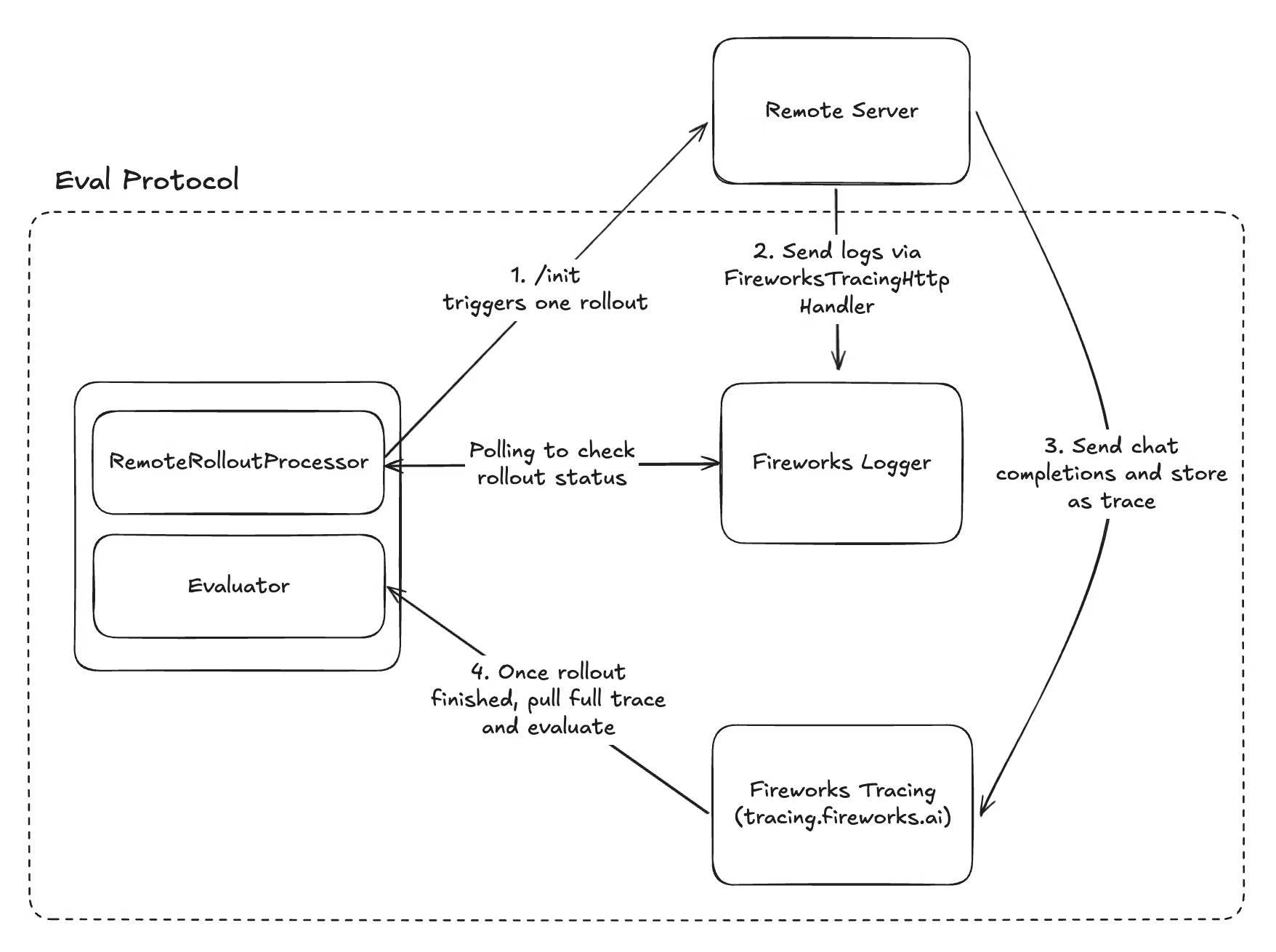
1
Fireworks triggers rollout
During training, Fireworks calls your service’s
POST /init endpoint with the dataset row and correlation metadata.2
Your service processes the rollout
Your agent executes the task (e.g., multi-turn conversation, tool calls, simulation steps), logging progress via Fireworks tracing.
3
Status reporting
Your service sends structured logs tagged with rollout metadata to Fireworks so the system can track completion.
4
Evaluation
Once Fireworks detects completion, it pulls the full trace and evaluates it using your scoring logic.
Everything except implementing your remote server is handled automatically by Eval Protocol. You only need to implement the
/init endpoint and add Fireworks tracing.Implementing the /init endpoint
Your remote service must implement a single/init endpoint that accepts rollout requests.
Request schema
object
required
Model configuration including model name and inference parameters like temperature, max_tokens, etc.
array
Array of conversation messages to send to the model
array
Array of available tools for the model (for function calling)
string
Base URL for making LLM calls through Fireworks tracing (includes correlation metadata)
object
required
Rollout execution metadata for correlation (rollout_id, run_id, row_id, etc.)
string
Fireworks API key to use for model calls
Example request
Metadata correlation
Themetadata object contains correlation IDs that you must include when logging to Fireworks tracing. This allows Eval Protocol to match logs and traces back to specific evaluation rows.
Required metadata fields:
invocation_id- Identifies the evaluation invocationexperiment_id- Groups related experimentsrollout_id- Unique ID for this specific rollout (most important)run_id- Identifies the evaluation runrow_id- Links to the dataset row
RemoteRolloutProcessor automatically generates these IDs and sends them to your server. You don’t need to create them yourself—just pass them through to your logging.Fireworks tracing integration
Your remote server must use Fireworks tracing to report rollout status. Eval Protocol polls these logs to detect when rollouts complete.Basic setup
Key components
- FireworksTracingHttpHandler: Sends logs to Fireworks tracing service
- RolloutIdFilter: Tags logs with the rollout ID for correlation
- Status objects: Structured status reporting that Eval Protocol can parse
Status.rollout_finished()- Signals successful completionStatus.rollout_error(message)- Signals failure with error details
Alternative: Environment variable approach
For simpler setups, you can use theEP_ROLLOUT_ID environment variable instead of manual filters.
- Single rollout per instance
- Separate processes
If your server processes one rollout at a time (e.g., serverless functions, container per request):
How Eval Protocol uses tracing
- Your server logs completion: Uses
Status.rollout_finished()orStatus.rollout_error() - Eval Protocol polls: Searches Fireworks logs by
rollout_idtag until completion signal found - Status extraction: Reads structured status fields (
code,message,details) to determine outcome - Trace retrieval: Fetches full trace of model calls and tool use for evaluation
Complete example
Here’s a minimal but complete remote server implementation:Testing locally
Before deploying, test your remote server locally:1
Start your server
2
Configure RemoteRolloutProcessor
In your evaluator test, point to your local server:
3
Run test evaluation
Deploying your service
Once tested locally, deploy to production:Deployment checklist
Deployment checklist
- ✅ Service is publicly accessible (or accessible via VPN/private network)
- ✅ HTTPS endpoint with valid SSL certificate (recommended)
- ✅ Authentication/authorization configured
- ✅ Monitoring and logging set up
- ✅ Auto-scaling configured for concurrent rollouts
- ✅ Error handling and retry logic implemented
- ✅ Service availability SLA meets training requirements
Platform-specific guides
Platform-specific guides
Vercel/Serverless:
- One rollout per function invocation
- Use environment variable approach
- Configure timeout for long-running evaluations
- Handle concurrent requests with proper worker configuration
- Use RolloutIdFilter approach
- Set up load balancing
- Ensure network connectivity from Fireworks
- Configure firewall rules
- Set up VPN if needed for security
Connecting to RFT
Once your remote server is deployed, create an RFT job that uses it:Troubleshooting
Rollouts timing out
Rollouts timing out
Symptoms: Rollouts show as timed out or never completeSolutions:
- Check that your service is logging
Status.rollout_finished()correctly - Verify Fireworks tracing handler is configured
- Ensure rollout_id is included in log tags
- Check for exceptions being swallowed without logging
Correlation errors
Correlation errors
Symptoms: Eval Protocol can’t match logs to rolloutsSolutions:
- Verify you’re using the exact
rollout_idfrom request metadata - Check that RolloutIdFilter or EP_ROLLOUT_ID is set correctly
- Ensure logs are being sent to Fireworks (check tracing dashboard)
Performance issues
Performance issues
Symptoms: Training is slow, high rollout latencySolutions:
- Scale your service to handle concurrent requests
- Optimize your agent logic (caching, async operations)
- Add more workers or instances
- Profile your code to find bottlenecks
Authentication failures
Authentication failures
Symptoms: Model calls fail, API errorsSolutions:
- Verify API key is passed correctly from request
- Check that your service has network access to Fireworks
- Ensure model_base_url is used for traced calls
Example implementations
Learn by example:SVG Agent (TypeScript)
Complete walkthrough using a Vercel TypeScript server for SVG generation
Hello World Example
Minimal Python implementation showing the basics
Next steps
Launch training
Launch your RFT job using the CLI
Monitor training
Track rollout progress and debug issues
Eval Protocol docs
Full Remote Rollout Processor tutorial
Evaluator best practices
Design effective reward functions
Agent tracing
Remote RFT needs correlated traces so the trainer can join rollouts, tool calls, and rewards. Your environment receivesmodel_base_url and correlation IDs in /init; model_base_url was an OpenAI-compatible endpoint on the hosted gateway (tracing.fireworks.ai).
Minimum wiring:
- Use
model_base_urlfrom/initfor all model calls (do not override). - Add
FireworksTracingHttpHandlerand logStatus.rollout_finished()orStatus.rollout_error()when the rollout ends. - Tag logs with
rollout_idviaRolloutIdFilterorEP_ROLLOUT_ID.
Next steps
Connect remote environment
Implement
/init, tracing, and structured status for remote agentsSmall model quickstart
Build and deploy a local evaluator in under 10 minutes
Launch training
Launch your RFT job
Evaluator best practices
Design effective reward functions for your task