
firerouter/opus makes the Opus family available to the router alongside Fireworks open models. In Claude Code, it may already appear in /model. If it does not, add it:
/model, and select firerouter/opus.
For coding harnesses, start with FireConnect. If your team uses an LLM gateway to access models, follow LLM Gateways. For direct API or SDK calls, see APIs and SDKs.
Choose a router
For open-only routing withauto or auto-instant, see Open Models. The routers below add a closed family, pin a closed model, or define custom route members.
Use a family name when you want new versions after Fireworks evaluates them. Use a full model ID when you need to pin a version.
Choose up to eight route members
List up to eight different models in one route:Pay for the model that serves each turn
You pay for the model that serves each turn:- Fireworks models bill to your Fireworks account at their serverless token rates.
- Closed-model usage bills through that provider’s credential.
- Cached input bills at the serving model’s cached-input rate.
model field to see which model served a request. Use Usage and Cost to review a Claude Code session.
Watch routing live
In Claude Code, open the harness and a live per-turn meter side by side: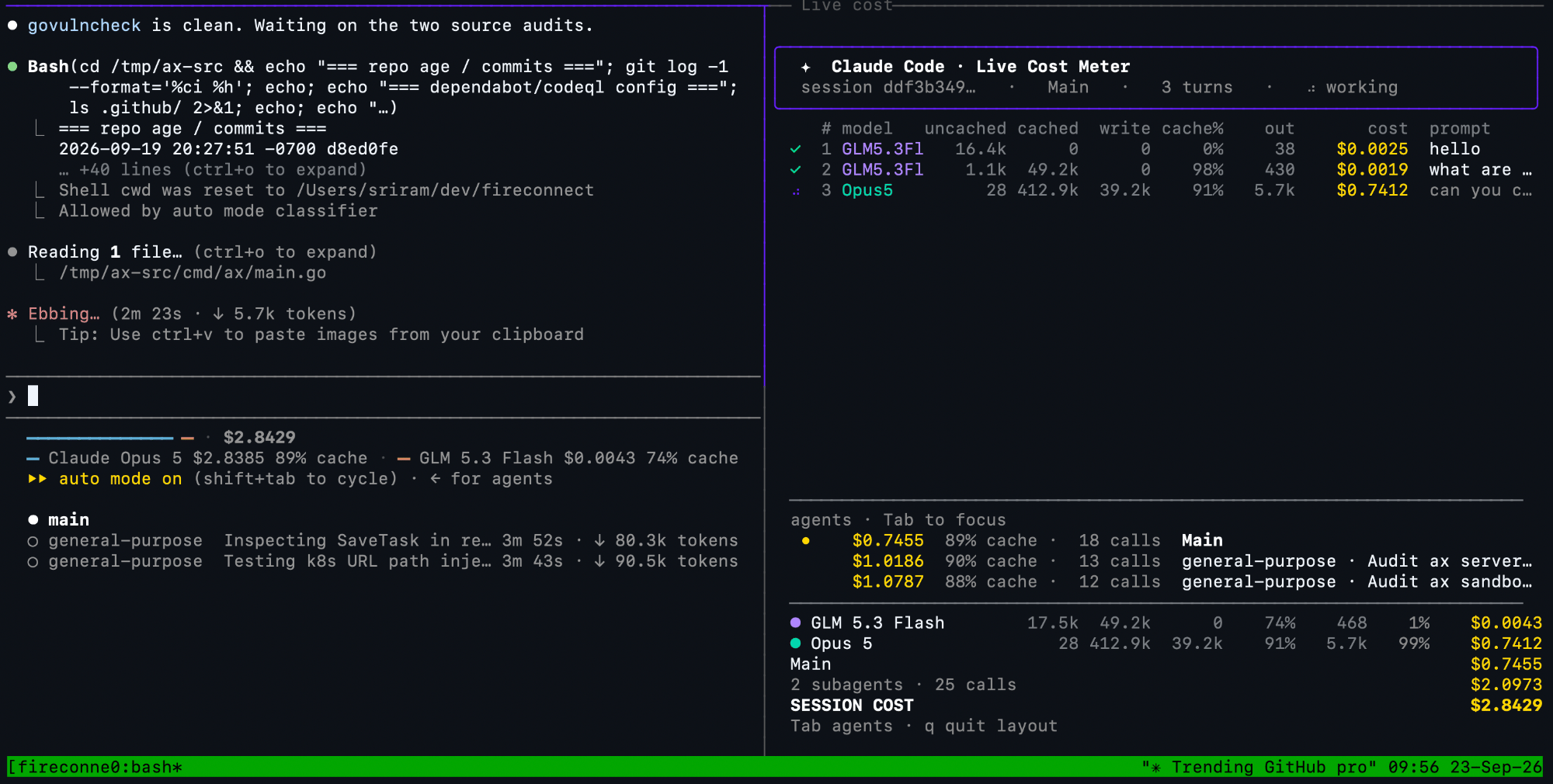
Claude Code beside the live per-turn model and cost meter
Balance quality and savings
Routing preference controls how strongly the router favors predicted quality or lower cost:max-intelligence, more-intelligence, balanced, more-savings, and max-savings. Support varies by harness. See Routing Preferences.
Connect credentials for closed models
Your Fireworks key is always required. Closed models also need a credential for their provider. Routes that include a Claude family alias or Anthropic model ID require an Anthropic credential. Examples includeopus and claude-opus-5-5. Routes that include Astra or another OpenAI model require an OpenAI credential. These rules apply to single-model and custom routes.
Account-level Provider Keys are the recommended setup because developers authenticate with only their Fireworks API key. See Harness Compatibility for harness-local alternatives and current FireConnect constraints. See Open Models for aliases, pinned models, image support, and US-only guidance.