> ## Documentation Index
> Fetch the complete documentation index at: https://docs.fireworks.ai/llms.txt
> Use this file to discover all available pages before exploring further.
> ## Agent Instructions
> For Fireworks Nexus, start at https://docs.fireworks.ai/nexus.
> Use https://docs.fireworks.ai/nexus/quickstart for coding harnesses, custom agents, APIs, SDKs, and LLM gateways.
> Use https://docs.fireworks.ai/ecosystem/firerouter/overview for model router types, composition, and pricing.
> Prefer canonical short model IDs such as firerouter/opus. In LiteLLM, use the fireworks_ai/ provider prefix.
> Family names such as opus track the latest evaluated family version; do not describe them as fixed model versions.
# Spend Limits
> Set account, group, and user-specific spend limits to cap per-user spend on supported Fireworks serverless models.
Set per-user spend caps for [supported serverless models](/nexus/usage-limits-reference#supported-models). Fireworks counts a user's spend on those models toward that user's effective limit across the account.
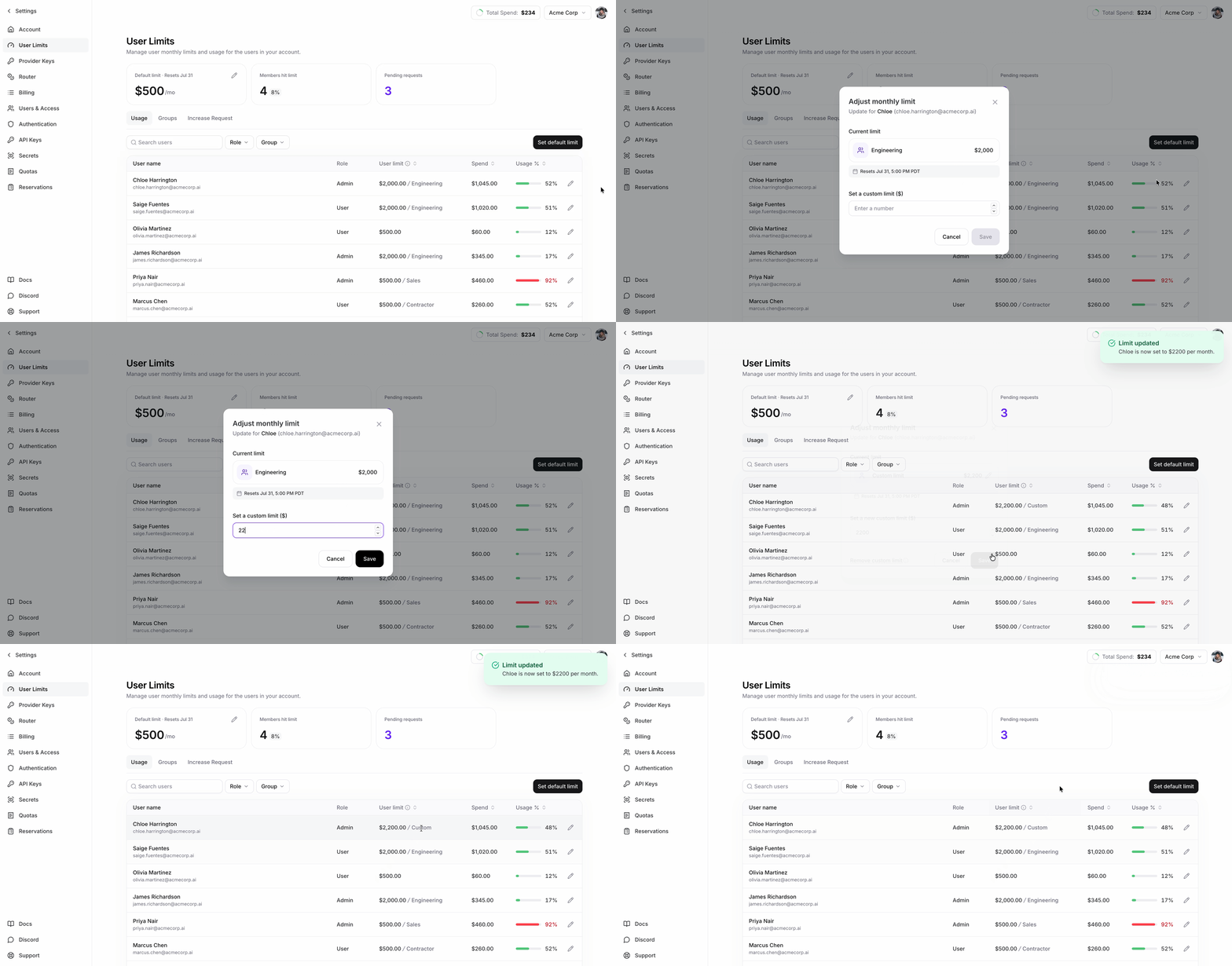
Manage limits on the [User Limits](https://app.fireworks.ai/settings/user-limits) page under **Settings**.
## Set defaults, group limits, and exceptions
| Control | Use it for |
| ------------------- | -------------------------------------------------------------------------------------------------------------------------------------------------------------------------------------------------------------- |
| **Account default** | The per-user ceiling for anyone without a group limit or user override. Productivity-only accounts receive a \$100 default when limits are provisioned. Other accounts have no default until an admin sets one |
| **Group limit** | A reusable per-user ceiling for SCIM-synced teams |
| **User override** | An exception for one person |
A user override takes precedence. If there is no override, the highest limit among the user's assigned groups applies. If there are no group limits, the account default applies.
 ## What happens when a user reaches the limit
* Spend counted toward the limit resets at the start of each billing period.
* After a user reaches their effective limit, requests to supported Fireworks serverless models return HTTP `402`.
* Raising the limit or starting a new billing period allows requests to supported Fireworks serverless models again after enforcement refreshes.
* Enforcement refreshes about once per minute, so changes can take 1–2 minutes in practice.
## Manage limits and monitor spend
The User Limits page shows current-period spend, effective limit, and limit source for each user. Admins can set the account default, manage group limits, and set user overrides.
Contact Fireworks to request access to per-user usage limits. Only admins can
change limits. Group limits also require [SCIM group
sync](/accounts/sso#group-provisioning).
For group precedence, supported models, `firectl`, and REST API examples, use [Spend Limits Reference](/nexus/usage-limits-reference).
## What happens when a user reaches the limit
* Spend counted toward the limit resets at the start of each billing period.
* After a user reaches their effective limit, requests to supported Fireworks serverless models return HTTP `402`.
* Raising the limit or starting a new billing period allows requests to supported Fireworks serverless models again after enforcement refreshes.
* Enforcement refreshes about once per minute, so changes can take 1–2 minutes in practice.
## Manage limits and monitor spend
The User Limits page shows current-period spend, effective limit, and limit source for each user. Admins can set the account default, manage group limits, and set user overrides.
Contact Fireworks to request access to per-user usage limits. Only admins can
change limits. Group limits also require [SCIM group
sync](/accounts/sso#group-provisioning).
For group precedence, supported models, `firectl`, and REST API examples, use [Spend Limits Reference](/nexus/usage-limits-reference).