> ## Documentation Index
> Fetch the complete documentation index at: https://docs.fireworks.ai/llms.txt
> Use this file to discover all available pages before exploring further.
> ## Agent Instructions
> For Fireworks Nexus, start at https://docs.fireworks.ai/nexus.
> Use https://docs.fireworks.ai/nexus/quickstart for coding harnesses, custom agents, APIs, SDKs, and LLM gateways.
> Use https://docs.fireworks.ai/nexus/firerouter for model router types, composition, and pricing.
> Prefer canonical short model IDs such as firerouter/opus. In LiteLLM, use the fireworks_ai/ provider prefix.
> Family names such as opus track the latest evaluated family version; do not describe them as fixed model versions.
# FireRouter
> Learn how Fireworks model routers choose a model for each user turn, how router IDs work, what credentials you need, and how serving models are billed.
Use one stable Fireworks model ID while a model router chooses a model for each new user turn. The selected model handles that turn, including its tool calls, until the next user turn. Family-based router IDs can advance as Fireworks updates the models behind them, without requiring you to change the ID.
For example, `firerouter/opus` makes the Opus family available to the router alongside Fireworks open models. In Claude Code, it may already appear in `/model`. If it does not, add it:
```bash wrap theme={null}
fireconnect claude --model firerouter/opus
```
Restart Claude Code, open `/model`, and select `firerouter/opus`.
For coding harnesses, start with [FireConnect](/nexus/fireconnect). If your team uses an LLM gateway to access models, follow [LLM Gateways](/nexus/llm-gateways). For direct API or SDK calls, see [APIs and SDKs](/nexus/apis-and-sdks).
## Choose a router
For open-only routing with `auto` or `auto-instant`, see [Open Models](/nexus/open-models). The routers below add a closed family, pin a closed model, or define custom route members.
| Router | What it includes | What can update |
| ---------------------------- | ------------------------------------------------------------------ | ------------------------------------------------------ |
| `firerouter` | The closed family available from your credential, plus open models | The closed model and open model as evaluations improve |
| `firerouter/opus` | The Opus family alias, plus open models | The model behind the alias and the open model |
| `firerouter/claude-opus-5-5` | One exact closed model, plus open models | The open model |
| `firerouter/opus/glm-5p3` | The route members you list | A family name such as `opus` can advance |
Use a **family name** when you want new versions after Fireworks evaluates them. Use a **full model ID** when you need to pin a version.
## Choose up to eight route members
List up to eight different models in one route:
```text theme={null}
firerouter/{model1}/{model2}/{model3}
```
Examples:
```text theme={null}
firerouter/opus/astra
firerouter/opus/glm-5p3
firerouter/claude-opus-5-5/gpt-6-astra/glm-5p3
```
A custom list defines the models considered during normal routing. The first model is the route's primary. The router still chooses a model for each new user turn. Every closed model needs a credential for its provider.
## Pay for the model that serves each turn
You pay for the model that serves each turn:
* **Fireworks models** bill to your Fireworks account at their serverless token rates.
* **Closed-model usage** bills through that provider's credential.
* **Cached input** bills at the serving model's cached-input rate.
Check the response `model` field to see which model served a request. Use [Usage and Cost](/nexus/metrics) to review a Claude Code session.
## Watch routing live
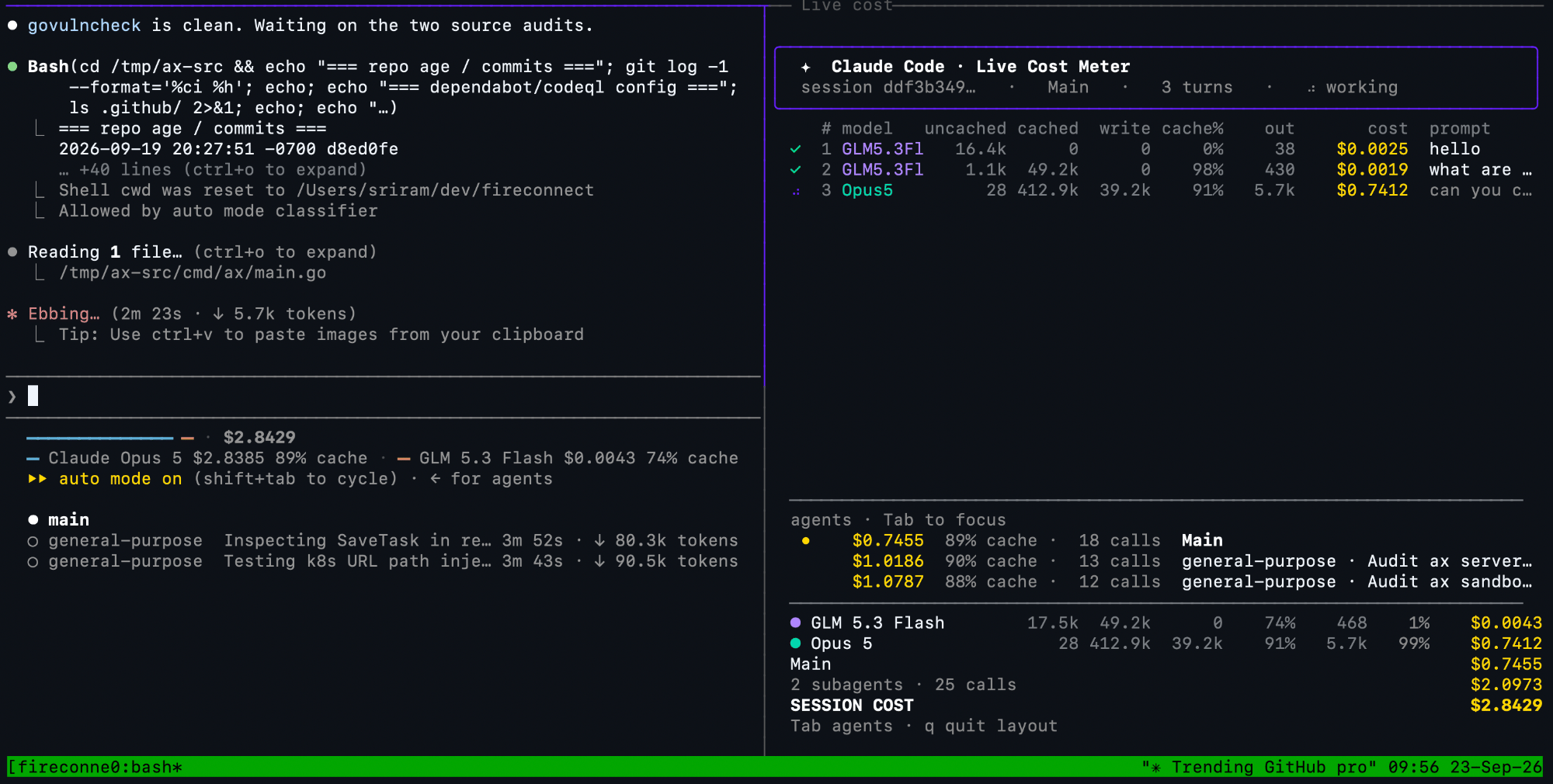
In Claude Code, open the harness and a live per-turn meter side by side:
```bash wrap theme={null}
fireconnect claude live
```
The left pane runs Claude Code. The right pane adds one row for each user turn, including the model or models selected, token buckets, estimated cost, and a prompt preview. Watch it update as the router moves between open and closed models.
 To resume a specific session:
```bash wrap theme={null}
fireconnect claude live --session
```
Meter controls and pricing details: [Session Cost](/nexus/session-usage).
## Balance quality and savings
Routing preference controls how strongly the router favors predicted quality or lower cost:
```bash wrap theme={null}
fireconnect claude \
--model firerouter \
--routing-preference balanced
```
Choose from `max-intelligence`, `more-intelligence`, `balanced`, `more-savings`, and `max-savings`. Support varies by harness. See [Routing Preferences](/nexus/routing-preferences).
## Connect credentials for closed models
Your Fireworks key is always required. Closed models also need a credential for their provider.
Routes that include a Claude family alias or Anthropic model ID require an Anthropic credential. Examples include `opus` and `claude-opus-5-5`. Routes that include Astra or another OpenAI model require an OpenAI credential. These rules apply to single-model and custom routes.
Account-level [Provider Keys](/nexus/provider-keys) are the recommended setup because developers authenticate with only their Fireworks API key. See [Harness Compatibility](/nexus/harness-compatibility) for harness-local alternatives and current FireConnect constraints. See [Open Models](/nexus/open-models) for aliases, pinned models, image support, and US-only guidance.
To resume a specific session:
```bash wrap theme={null}
fireconnect claude live --session
```
Meter controls and pricing details: [Session Cost](/nexus/session-usage).
## Balance quality and savings
Routing preference controls how strongly the router favors predicted quality or lower cost:
```bash wrap theme={null}
fireconnect claude \
--model firerouter \
--routing-preference balanced
```
Choose from `max-intelligence`, `more-intelligence`, `balanced`, `more-savings`, and `max-savings`. Support varies by harness. See [Routing Preferences](/nexus/routing-preferences).
## Connect credentials for closed models
Your Fireworks key is always required. Closed models also need a credential for their provider.
Routes that include a Claude family alias or Anthropic model ID require an Anthropic credential. Examples include `opus` and `claude-opus-5-5`. Routes that include Astra or another OpenAI model require an OpenAI credential. These rules apply to single-model and custom routes.
Account-level [Provider Keys](/nexus/provider-keys) are the recommended setup because developers authenticate with only their Fireworks API key. See [Harness Compatibility](/nexus/harness-compatibility) for harness-local alternatives and current FireConnect constraints. See [Open Models](/nexus/open-models) for aliases, pinned models, image support, and US-only guidance.