> ## Documentation Index
> Fetch the complete documentation index at: https://docs.fireworks.ai/llms.txt
> Use this file to discover all available pages before exploring further.
> ## Agent Instructions
> For Fireworks Nexus, start at https://docs.fireworks.ai/nexus.
> Use https://docs.fireworks.ai/nexus/quickstart for coding harnesses, custom agents, APIs, SDKs, and LLM gateways.
> Use https://docs.fireworks.ai/nexus/firerouter for model router types, composition, and pricing.
> Prefer canonical short model IDs such as firerouter/opus. In LiteLLM, use the fireworks_ai/ provider prefix.
> Family names such as opus track the latest evaluated family version; do not describe them as fixed model versions.
# Side-by-Side Demo
> Race two models through Claude Code on the same prompt with fireconnect claude demo
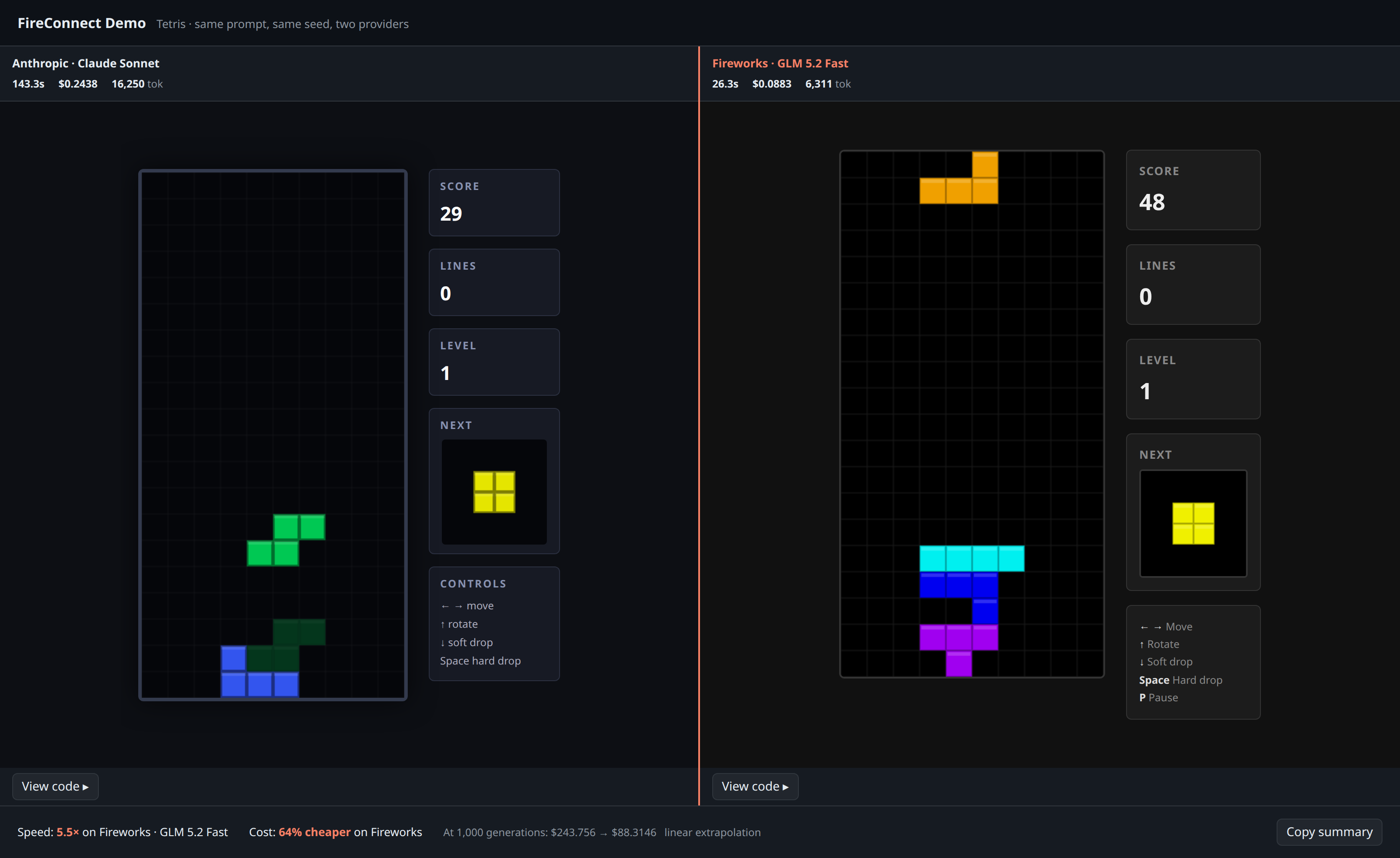
`fireconnect claude demo` sends the same code-generation prompt to two models through your current FireConnect Claude profile. It shows both runs together so you can compare speed, estimated cost, and output.
Each model runs in a separate temporary working directory. The demo does not modify `~/.claude/settings.json`.
## Compare the results
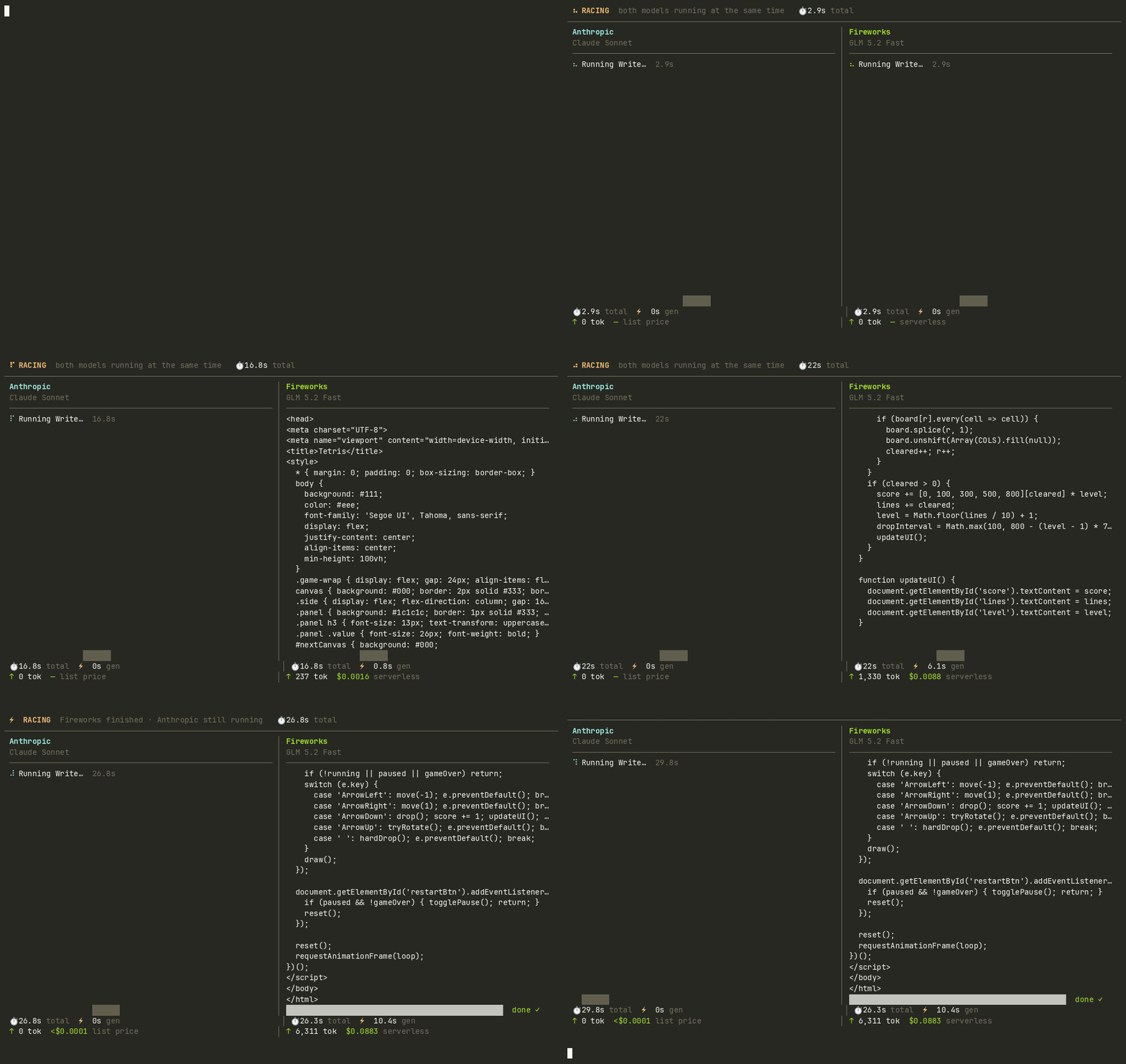
* **Live terminal race:** Watch both models stream code with token counts and wall-clock timers.
* **Browser comparison:** Run both generated apps side by side and compare measured speed and estimated cost.
* **Saved output:** Find `compare.html`, `result.json`, generated apps, and logs in `./fireconnect-demo/`.
### Compare the generated apps
 ### Watch both models run
 ## Requirements
* [FireConnect installed](/nexus/fireconnect#quick-start)
* Claude Code available as `claude` on your `PATH`
* Claude Code connected with `fireconnect claude`
The demo supports Claude Code only. Both sides use the authentication and routing from your active FireConnect profile.
## Run the demo
```bash wrap theme={null}
fireconnect claude demo
```
That runs the default **Tetris** preset: both sides get the same prompt to build a playable game in a single HTML file.
### Choose a prompt
```bash wrap theme={null}
fireconnect claude demo --prompt snake
fireconnect claude demo --prompt clock
fireconnect claude demo --prompt "Build a todo app in one HTML file"
fireconnect claude demo --prompt-file ./task.txt
```
Built-in presets are `tetris`, `snake`, and `clock`. Tetris is the default. Use `--prompt` for custom text or `--prompt-file` to read a task from a file.
### Choose models
```bash wrap theme={null}
fireconnect claude demo --left-model opus --right-model glm-fast-latest
```
The defaults are `opus` on the left and `glm-fast-latest` on the right. Here, `opus` is a Claude Code alias, not a Fireworks model ID. You can use any model or Claude alias available in the connected profile.
### Automate a race
```bash wrap theme={null}
fireconnect claude demo --yes --no-open --json
```
| Flag | What it does |
| --------------------------- | ------------------------------------------------------------------------------ |
| `--yes` | Skip the setup form |
| `--no-open` | Do not open a browser; write outputs to disk only |
| `--json` | Print a machine-readable result to stdout (skips the TUI) |
| `--out ` | Output directory (default: `./fireconnect-demo/`) |
| `--prompt-file ` | Read a custom task from a file (overrides the preset) |
| `--left-model ` | Left model (default: `opus`) |
| `--right-model ` | Right model (default: `glm-fast-latest`) |
| `--challenger ` | Alias for `--right-model` |
| `--anthropic-model ` | Alias for `--left-model` (`opus`, `sonnet`, `haiku`, or `fable`) |
| `--api-key ` | Override the Fireworks key resolved from the environment or FireConnect config |
## Clean up
```bash wrap theme={null}
fireconnect claude demo clean # prompts before deleting ./fireconnect-demo/
fireconnect claude demo clean --yes # delete without prompting
fireconnect claude demo clean --out /path/to/output
```
`demo clean` deletes an output directory only when it contains a demo marker such as `result.json` or `compare.html`. It leaves unrelated directories untouched.
## How results are produced
* Each side runs `claude -p` in a separate temporary directory with the same prompt and active FireConnect profile. Only the model changes.
* Speed comes from the measured run. Estimated cost uses token counts and the published rate for each model.
* If a model fails, the comparison reports the failure instead of declaring a winner.
* `compare.html` contains both apps and works offline.
## Related documentation
* [Harness Compatibility](/nexus/harness-compatibility)
* [FireRouter](/nexus/firerouter)
* [CLI Reference](/nexus/cli-reference)
## Requirements
* [FireConnect installed](/nexus/fireconnect#quick-start)
* Claude Code available as `claude` on your `PATH`
* Claude Code connected with `fireconnect claude`
The demo supports Claude Code only. Both sides use the authentication and routing from your active FireConnect profile.
## Run the demo
```bash wrap theme={null}
fireconnect claude demo
```
That runs the default **Tetris** preset: both sides get the same prompt to build a playable game in a single HTML file.
### Choose a prompt
```bash wrap theme={null}
fireconnect claude demo --prompt snake
fireconnect claude demo --prompt clock
fireconnect claude demo --prompt "Build a todo app in one HTML file"
fireconnect claude demo --prompt-file ./task.txt
```
Built-in presets are `tetris`, `snake`, and `clock`. Tetris is the default. Use `--prompt` for custom text or `--prompt-file` to read a task from a file.
### Choose models
```bash wrap theme={null}
fireconnect claude demo --left-model opus --right-model glm-fast-latest
```
The defaults are `opus` on the left and `glm-fast-latest` on the right. Here, `opus` is a Claude Code alias, not a Fireworks model ID. You can use any model or Claude alias available in the connected profile.
### Automate a race
```bash wrap theme={null}
fireconnect claude demo --yes --no-open --json
```
| Flag | What it does |
| --------------------------- | ------------------------------------------------------------------------------ |
| `--yes` | Skip the setup form |
| `--no-open` | Do not open a browser; write outputs to disk only |
| `--json` | Print a machine-readable result to stdout (skips the TUI) |
| `--out ` | Output directory (default: `./fireconnect-demo/`) |
| `--prompt-file ` | Read a custom task from a file (overrides the preset) |
| `--left-model ` | Left model (default: `opus`) |
| `--right-model ` | Right model (default: `glm-fast-latest`) |
| `--challenger ` | Alias for `--right-model` |
| `--anthropic-model ` | Alias for `--left-model` (`opus`, `sonnet`, `haiku`, or `fable`) |
| `--api-key ` | Override the Fireworks key resolved from the environment or FireConnect config |
## Clean up
```bash wrap theme={null}
fireconnect claude demo clean # prompts before deleting ./fireconnect-demo/
fireconnect claude demo clean --yes # delete without prompting
fireconnect claude demo clean --out /path/to/output
```
`demo clean` deletes an output directory only when it contains a demo marker such as `result.json` or `compare.html`. It leaves unrelated directories untouched.
## How results are produced
* Each side runs `claude -p` in a separate temporary directory with the same prompt and active FireConnect profile. Only the model changes.
* Speed comes from the measured run. Estimated cost uses token counts and the published rate for each model.
* If a model fails, the comparison reports the failure instead of declaring a winner.
* `compare.html` contains both apps and works offline.
## Related documentation
* [Harness Compatibility](/nexus/harness-compatibility)
* [FireRouter](/nexus/firerouter)
* [CLI Reference](/nexus/cli-reference)