> ## Documentation Index
> Fetch the complete documentation index at: https://docs.fireworks.ai/llms.txt
> Use this file to discover all available pages before exploring further.
# Reasoning
> How to use reasoning with Fireworks models
For thinking/reasoning models, Fireworks provides access to the model's
reasoning process through the `reasoning_content` field. This field contains the
model's internal reasoning, which would otherwise appear in ``
tags within the content field. For some models, the reasoning content may
instead be included directly in the content field itself.
### Prerequisites
We recommend using the [Fireworks Python SDK](/tools-sdks/python-sdk) to work with
reasoning, as it supports Fireworks-specific parameters and response fields.
The SDK is currently in alpha. Use the `--pre` flag when installing to get the latest version.
```bash pip theme={null}
pip install --pre fireworks-ai
```
```bash poetry theme={null}
poetry add --pre fireworks-ai
```
```bash uv theme={null}
uv add --pre fireworks-ai
```
### Basic usage
Select a reasoning model from our [serverless model library](https://app.fireworks.ai/models/?filter=Serverless).
```python lines highlight={16-18} theme={null}
from fireworks import Fireworks
client = Fireworks()
completion = client.chat.completions.create(
messages=[
{
"role": "user",
"content": "What is 25 * 37?",
}
],
model="accounts/fireworks/models/",
)
for choice in completion.choices:
# Access the reasoning content (thinking process)
if choice.message.reasoning_content:
print("Reasoning:", choice.message.reasoning_content)
print("Answer:", choice.message.content)
```
### Controlling reasoning effort
You can control the reasoning token length using either the `reasoning_effort` parameter or the Anthropic-compatible `thinking` parameter.
#### Using `reasoning_effort`
The [`reasoning_effort`](/api-reference/post-chatcompletions) parameter accepts string values like `"low"`, `"medium"`, or `"high"`:
```python lines highlight={9} theme={null}
completion = client.chat.completions.create(
messages=[
{
"role": "user",
"content": "Solve this step by step: If a train travels at 60 mph for 2.5 hours, how far does it go?",
}
],
model="accounts/fireworks/models/",
reasoning_effort="medium",
)
```
See the [reasoning\_effort](/api-reference/post-chatcompletions) parameter for more details.
#### Using `thinking` (Anthropic-compatible)
Alternatively, you can use the [`thinking`](/api-reference/post-chatcompletions) parameter, which provides an Anthropic-compatible format for controlling reasoning behavior:
```python lines highlight={9-12} theme={null}
completion = client.chat.completions.create(
messages=[
{
"role": "user",
"content": "Solve this step by step: If a train travels at 60 mph for 2.5 hours, how far does it go?",
}
],
model="accounts/fireworks/models/",
thinking={
"type": "enabled",
"budget_tokens": 4096, # Must be >= 1024
},
)
```
See the [thinking](/api-reference/post-chatcompletions) parameter for more details.
You cannot specify both `thinking` and `reasoning_effort` in the same request. If both are provided, a validation error will be raised.
### Streaming with reasoning content
When streaming, the reasoning content is available in each chunk's delta:
```python lines highlight={21-23} theme={null}
from fireworks import Fireworks
client = Fireworks()
stream = client.chat.completions.create(
messages=[
{
"role": "user",
"content": "What is the square root of 144?",
}
],
model="accounts/fireworks/models/",
reasoning_effort="medium",
stream=True,
)
reasoning_parts = []
content_parts = []
for chunk in stream:
delta = chunk.choices[0].delta
if delta.reasoning_content:
reasoning_parts.append(delta.reasoning_content)
if delta.content:
content_parts.append(delta.content)
print("Reasoning:", "".join(reasoning_parts))
print("Answer:", "".join(content_parts))
```
### Interleaved thinking
When building multi-turn tool-calling agents with models that support
interleaved thinking, you **MUST** include the `reasoning_content` from previous
assistant turns in subsequent requests. This enables the model to think between tool calls and after receiving tool results, allowing for more complex, step-by-step reasoning.
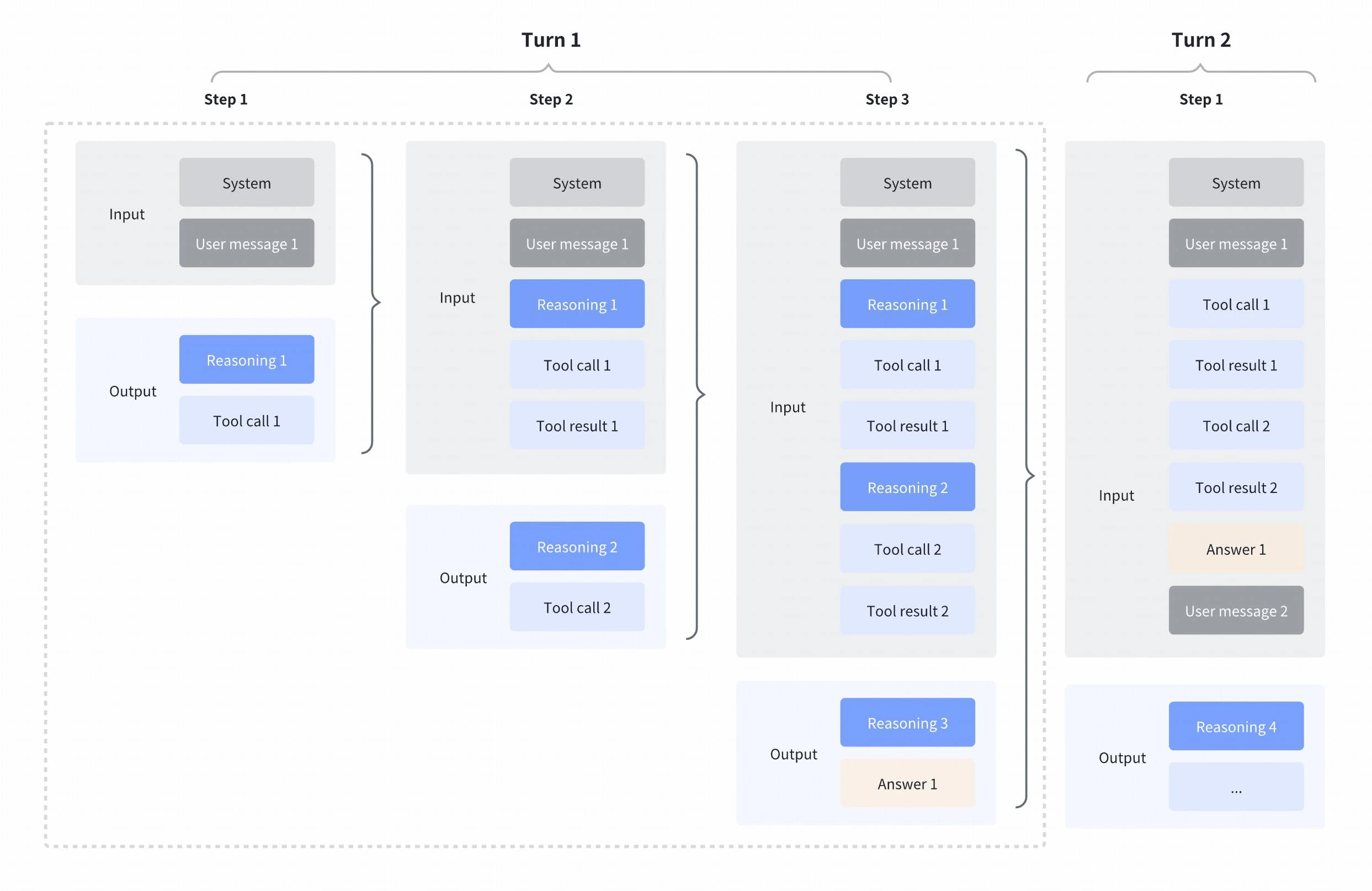 You can preserve reasoning context in two ways:
1. **Pass the `Message` object directly** (recommended) - The SDK message object
already contains the `reasoning_content` field alongside `content` and `tool_calls`
2. **Manually include `reasoning_content`** - When constructing messages as
dictionaries, explicitly add the `reasoning_content` field
Interleaved thinking is triggered when the last message in your API request
has `"role": "tool"`, enabling the model to use its previous reasoning process
when responding to the tool result. If a model does not support interleaved
thinking, it simply ignores the extra reasoning context so this pattern is
safe to use broadly.
Here's how to preserve reasoning context using both approaches:
```python theme={null}
# First turn: Get a response with reasoning_content
first_response = client.chat.completions.create(
messages=[{"role": "user", "content": "What is 15 + 27?"}],
model="accounts/fireworks/models/",
tools=tools,
)
# The assistant message contains reasoning_content, content, and tool_calls
assistant_message = first_response.choices[0].message
# assistant_message.reasoning_content -> "The user is asking for addition..."
# assistant_message.tool_calls -> [ToolCall(id="...", function=...)]
# Second turn: Pass the Message object directly
# This automatically includes reasoning_content alongside the message
second_response = client.chat.completions.create(
messages=[
{"role": "user", "content": "What is 15 + 27?"},
assistant_message, # Pass the complete Message object
{"role": "tool", "content": "42", "tool_call_id": assistant_message.tool_calls[0].id},
],
model="accounts/fireworks/models/",
tools=tools,
)
```
```python theme={null}
# First turn: Get a response with reasoning_content
first_response = client.chat.completions.create(
messages=[{"role": "user", "content": "What is 15 + 27?"}],
model="accounts/fireworks/models/",
tools=tools,
)
assistant_message = first_response.choices[0].message
# Second turn: Manually construct the assistant message dict
# Include reasoning_content explicitly alongside role, content, and tool_calls
second_response = client.chat.completions.create(
messages=[
{"role": "user", "content": "What is 15 + 27?"},
{
"role": "assistant",
"content": assistant_message.content,
"reasoning_content": assistant_message.reasoning_content, # Include reasoning
"tool_calls": assistant_message.tool_calls,
},
{"role": "tool", "content": "42", "tool_call_id": assistant_message.tool_calls[0].id},
],
model="accounts/fireworks/models/",
tools=tools,
)
```
The Anthropic SDK uses `thinking` content blocks instead of `reasoning_content`. Pass the full `content` array (including thinking blocks) back as the assistant message, and send tool results as `tool_result` content blocks:
```python theme={null}
import anthropic
client = anthropic.Anthropic(
api_key=os.environ.get("FIREWORKS_API_KEY"),
base_url="https://api.fireworks.ai/inference",
)
tools = [
{
"name": "calculator",
"description": "Perform basic arithmetic operations",
"input_schema": {
"type": "object",
"properties": {
"operation": {"type": "string", "enum": ["add", "subtract", "multiply", "divide"]},
"a": {"type": "number"},
"b": {"type": "number"},
},
"required": ["operation", "a", "b"],
},
}
]
# First turn: thinking + tool_use
first_response = client.messages.create(
model="accounts/fireworks/models/",
max_tokens=16000,
thinking={"type": "enabled", "budget_tokens": 4096},
messages=[{"role": "user", "content": "What is 15 + 27? Use the calculator."}],
tools=tools,
)
# Response content includes [thinking_block, tool_use_block]
for block in first_response.content:
if block.type == "thinking":
print(f"Thinking: {block.thinking[:100]}...")
elif block.type == "tool_use":
print(f"Tool: {block.name}({block.input})")
tool_use = next(b for b in first_response.content if b.type == "tool_use")
# Second turn: pass back the full content array (with thinking blocks) + tool result
second_response = client.messages.create(
model="accounts/fireworks/models/",
max_tokens=16000,
thinking={"type": "enabled", "budget_tokens": 4096},
messages=[
{"role": "user", "content": "What is 15 + 27? Use the calculator."},
{"role": "assistant", "content": first_response.content},
{
"role": "user",
"content": [
{"type": "tool_result", "tool_use_id": tool_use.id, "content": "42"}
],
},
],
tools=tools,
)
# The model thinks again (interleaved) and produces a text answer
for block in second_response.content:
if block.type == "thinking":
print(f"Thinking: {block.thinking[:100]}...")
elif block.type == "text":
print(f"Answer: {block.text}")
```
If you construct the assistant message manually as a dictionary but omit the
`reasoning_content` field, the model will not have access to its previous
reasoning process.
The following script demonstrates this behavior and validates that the
`reasoning_content` from the first turn is included in subsequent requests:
```python main.py expandable theme={null}
"""Test that reasoning_content is passed in multi-turn conversations.
This test proves that reasoning_content from previous turns is included
in subsequent requests by examining the raw prompt sent to the model.
"""
from fireworks import Fireworks
from dotenv import load_dotenv
load_dotenv()
client = Fireworks()
MODEL = "accounts/fireworks/models/kimi-k2-thinking"
# MODEL = "accounts/fireworks/models/minimax-m2"
# Define tools to enable interleaved thinking
tools = [
{
"type": "function",
"function": {
"name": "calculator",
"description": "Perform basic arithmetic operations",
"parameters": {
"type": "object",
"properties": {
"operation": {
"type": "string",
"enum": ["add", "subtract", "multiply", "divide"],
},
"a": {"type": "number"},
"b": {"type": "number"},
},
"required": ["operation", "a", "b"],
},
},
}
]
def print_header(title: str, char: str = "═", width: int = 60):
"""Print a formatted section header."""
print(f"\n{char * width}")
print(f" {title}")
print(f"{char * width}")
def print_field(label: str, value: str, indent: int = 2):
"""Print a labeled field with optional indentation."""
prefix = " " * indent
print(f"{prefix}{label}: {value}")
def print_multiline(label: str, content: str, max_preview: int = 200, indent: int = 2):
"""Print multiline content with a label and optional truncation."""
prefix = " " * indent
print(f"{prefix}{label}:")
preview = content[:max_preview] + "..." if len(content) > max_preview else content
for line in preview.split("\n"):
print(f"{prefix} │ {line}")
# First turn - get a response with reasoning_content
print_header("FIRST TURN", "═")
first_response = client.chat.completions.create(
messages=[
{
"role": "user",
"content": "What is 15 + 27?",
}
],
model=MODEL,
tools=tools,
)
print_field("📝 Content", first_response.choices[0].message.content or "(none)")
reasoning = first_response.choices[0].message.reasoning_content
print_multiline("💭 Reasoning", reasoning)
# Print tool call (verified) from the first response
tool_calls = first_response.choices[0].message.tool_calls
assert tool_calls, "No tool calls in first response!"
print(f"\n 🔧 Tool Calls ({len(tool_calls)}):")
for i, tc in enumerate(tool_calls, 1):
print(f" [{i}] id={tc.id}")
print(f" function={tc.function.name}")
print(f" arguments={tc.function.arguments}")
tool_call_id = first_response.choices[0].message.tool_calls[0].id
# Verify we got reasoning_content
assert reasoning and len(reasoning) > 0, "No reasoning_content in first response!"
print("\n ✓ First response has reasoning_content")
# Second turn - include the first assistant message
print_header("SECOND TURN", "═")
second_response = client.chat.completions.create(
messages=[
{
"role": "user",
"content": "What is 15 + 27?",
},
first_response.choices[0].message, # Includes reasoning_content
{"role": "tool", "content": "42", "tool_call_id": tool_call_id},
],
model=MODEL,
tools=tools,
raw_output=True,
)
print_field("📝 Answer", second_response.choices[0].message.content or "(none)")
# Extract and display the raw prompt that was sent to the model
raw_prompt = second_response.choices[0].raw_output.prompt_fragments[0]
print_header("RAW PROMPT SENT TO MODEL", "─")
print(raw_prompt)
# Check if reasoning_content from first turn is in the raw prompt
has_reasoning_content = reasoning[:50] in raw_prompt
print_header("RESULT", "═")
if has_reasoning_content:
print(" ✅ SUCCESS: reasoning_content IS included in subsequent requests!")
else:
print(" ❌ FAILED: reasoning_content not found in raw prompt")
print()
```
Below is the expected output:
```txt Kimi-K2-Thinking (output) expandable theme={null}
════════════════════════════════════════════════════════════
FIRST TURN
════════════════════════════════════════════════════════════
📝 Content: (none)
💭 Reasoning:
│ The user is asking for a simple addition calculation: 15 + 27.
│
│ I should use the calculator function with:
│ - operation: "add"
│ - a: 15
│ - b: 27
🔧 Tool Calls (1):
[1] id=functions.calculator:0
function=calculator
arguments={"operation": "add", "a": 15, "b": 27}
✓ First response has reasoning_content
════════════════════════════════════════════════════════════
SECOND TURN
════════════════════════════════════════════════════════════
📝 Answer: 15 + 27 = 42
────────────────────────────────────────────────────────────
RAW PROMPT SENT TO MODEL
────────────────────────────────────────────────────────────
<|im_system|>tool_declare<|im_middle|>[{"function":{"description":"Perform basic arithmetic operations","name":"calculator","parameters":{"properties":{"a":{"type":"number"},"b":{"type":"number"},"operation":{"enum":["add","subtract","multiply","divide"],"type":"string"}},"required":["operation","a","b"],"type":"object"}},"type":"function"}]<|im_end|><|im_user|>user<|im_middle|>What is 15 + 27?<|im_end|><|im_assistant|>assistant<|im_middle|>The user is asking for a simple addition calculation: 15 + 27.
I should use the calculator function with:
- operation: "add"
- a: 15
- b: 27<|tool_calls_section_begin|><|tool_call_begin|>functions.calculator:0<|tool_call_argument_begin|>{"operation": "add", "a": 15, "b": 27}<|tool_call_end|><|tool_calls_section_end|><|im_end|><|im_system|>tool<|im_middle|>## Return of None
42<|im_end|><|im_assistant|>assistant<|im_middle|>
════════════════════════════════════════════════════════════
RESULT
════════════════════════════════════════════════════════════
✅ SUCCESS: reasoning_content IS included in subsequent requests!
```
```txt Minimax-M2 (output) expandable theme={null}
════════════════════════════════════════════════════════════
FIRST TURN
════════════════════════════════════════════════════════════
📝 Content: (none)
💭 Reasoning:
│
│ Okay, the user is asking a simple arithmetic question: "What is 15 + 27?". This is a basic addition operation. I have a calculator tool available that can perform arithmetic operations. This is the p...
🔧 Tool Calls (1):
[1] id=chatcmpl-tool-249757d9ac8f4ca9afbdb580ced40ae6
function=calculator
arguments={"operation": "add", "a": 15, "b": 27}
✓ First response has reasoning_content
════════════════════════════════════════════════════════════
SECOND TURN
════════════════════════════════════════════════════════════
📝 Answer: 42
────────────────────────────────────────────────────────────
RAW PROMPT SENT TO MODEL
────────────────────────────────────────────────────────────
]~b]system
You are a helpful assistant.
# Tools
You may call one or more tools to assist with the user query.
Here are the tools available in JSONSchema format:
{"name": "calculator", "description": "Perform basic arithmetic operations", "parameters": {"type": "object", "properties": {"operation": {"type": "string", "enum": ["add", "subtract", "multiply", "divide"]}, "a": {"type": "number"}, "b": {"type": "number"}}, "required": ["operation", "a", "b"]}}
When making tool calls, use XML format to invoke tools and pass parameters:
param-value-1
param-value-2
...
[e~[
]~b]user
What is 15 + 27?[e~[
]~b]ai
Okay, the user is asking a simple arithmetic question: "What is 15 + 27?". This is a basic addition operation. I have a calculator tool available that can perform arithmetic operations. This is the perfect tool for this task.
Looking at the calculator tool parameters, I need to provide:
1. The operation: In this case, it would be "add" since we're adding two numbers
2. The first number: 15
3. The second number: 27
The calculator tool will handle the actual computation. Addition is one of the most basic arithmetic operations, so I'm confident the calculator tool can handle this correctly. I don't need to do the calculation manually since we have a dedicated tool for this.
The user might be expecting me to simply state the answer, but using the calculator tool will ensure accuracy and follows the guidelines of using available tools when appropriate. The tool will take the two numbers (15 and 27) and add them together.
So I'll make a tool call to the calculator with the operation "add", a=15, and b=27. The calculator will perform the addition and return the result, which I can then provide to the user as the final answer.
This is a straightforward request that aligns perfectly with the calculator tool's functionality. No additional clarification is needed from the user, and the operation doesn't require any special handling.
add
15
27
[e~[
]~b]tool
42[e~[
]~b]ai
════════════════════════════════════════════════════════════
RESULT
════════════════════════════════════════════════════════════
✅ SUCCESS: reasoning_content IS included in subsequent requests!
```
### Preserved thinking
While interleaved thinking preserves reasoning within a single turn (across tool calls), **preserved thinking** extends this concept across multiple user turns. This allows the model to retain reasoning content from previous assistant turns in the conversation context, enabling more coherent multi-turn reasoning.
You can preserve reasoning context in two ways:
1. **Pass the `Message` object directly** (recommended) - The SDK message object
already contains the `reasoning_content` field alongside `content` and `tool_calls`
2. **Manually include `reasoning_content`** - When constructing messages as
dictionaries, explicitly add the `reasoning_content` field
Interleaved thinking is triggered when the last message in your API request
has `"role": "tool"`, enabling the model to use its previous reasoning process
when responding to the tool result. If a model does not support interleaved
thinking, it simply ignores the extra reasoning context so this pattern is
safe to use broadly.
Here's how to preserve reasoning context using both approaches:
```python theme={null}
# First turn: Get a response with reasoning_content
first_response = client.chat.completions.create(
messages=[{"role": "user", "content": "What is 15 + 27?"}],
model="accounts/fireworks/models/",
tools=tools,
)
# The assistant message contains reasoning_content, content, and tool_calls
assistant_message = first_response.choices[0].message
# assistant_message.reasoning_content -> "The user is asking for addition..."
# assistant_message.tool_calls -> [ToolCall(id="...", function=...)]
# Second turn: Pass the Message object directly
# This automatically includes reasoning_content alongside the message
second_response = client.chat.completions.create(
messages=[
{"role": "user", "content": "What is 15 + 27?"},
assistant_message, # Pass the complete Message object
{"role": "tool", "content": "42", "tool_call_id": assistant_message.tool_calls[0].id},
],
model="accounts/fireworks/models/",
tools=tools,
)
```
```python theme={null}
# First turn: Get a response with reasoning_content
first_response = client.chat.completions.create(
messages=[{"role": "user", "content": "What is 15 + 27?"}],
model="accounts/fireworks/models/",
tools=tools,
)
assistant_message = first_response.choices[0].message
# Second turn: Manually construct the assistant message dict
# Include reasoning_content explicitly alongside role, content, and tool_calls
second_response = client.chat.completions.create(
messages=[
{"role": "user", "content": "What is 15 + 27?"},
{
"role": "assistant",
"content": assistant_message.content,
"reasoning_content": assistant_message.reasoning_content, # Include reasoning
"tool_calls": assistant_message.tool_calls,
},
{"role": "tool", "content": "42", "tool_call_id": assistant_message.tool_calls[0].id},
],
model="accounts/fireworks/models/",
tools=tools,
)
```
The Anthropic SDK uses `thinking` content blocks instead of `reasoning_content`. Pass the full `content` array (including thinking blocks) back as the assistant message, and send tool results as `tool_result` content blocks:
```python theme={null}
import anthropic
client = anthropic.Anthropic(
api_key=os.environ.get("FIREWORKS_API_KEY"),
base_url="https://api.fireworks.ai/inference",
)
tools = [
{
"name": "calculator",
"description": "Perform basic arithmetic operations",
"input_schema": {
"type": "object",
"properties": {
"operation": {"type": "string", "enum": ["add", "subtract", "multiply", "divide"]},
"a": {"type": "number"},
"b": {"type": "number"},
},
"required": ["operation", "a", "b"],
},
}
]
# First turn: thinking + tool_use
first_response = client.messages.create(
model="accounts/fireworks/models/",
max_tokens=16000,
thinking={"type": "enabled", "budget_tokens": 4096},
messages=[{"role": "user", "content": "What is 15 + 27? Use the calculator."}],
tools=tools,
)
# Response content includes [thinking_block, tool_use_block]
for block in first_response.content:
if block.type == "thinking":
print(f"Thinking: {block.thinking[:100]}...")
elif block.type == "tool_use":
print(f"Tool: {block.name}({block.input})")
tool_use = next(b for b in first_response.content if b.type == "tool_use")
# Second turn: pass back the full content array (with thinking blocks) + tool result
second_response = client.messages.create(
model="accounts/fireworks/models/",
max_tokens=16000,
thinking={"type": "enabled", "budget_tokens": 4096},
messages=[
{"role": "user", "content": "What is 15 + 27? Use the calculator."},
{"role": "assistant", "content": first_response.content},
{
"role": "user",
"content": [
{"type": "tool_result", "tool_use_id": tool_use.id, "content": "42"}
],
},
],
tools=tools,
)
# The model thinks again (interleaved) and produces a text answer
for block in second_response.content:
if block.type == "thinking":
print(f"Thinking: {block.thinking[:100]}...")
elif block.type == "text":
print(f"Answer: {block.text}")
```
If you construct the assistant message manually as a dictionary but omit the
`reasoning_content` field, the model will not have access to its previous
reasoning process.
The following script demonstrates this behavior and validates that the
`reasoning_content` from the first turn is included in subsequent requests:
```python main.py expandable theme={null}
"""Test that reasoning_content is passed in multi-turn conversations.
This test proves that reasoning_content from previous turns is included
in subsequent requests by examining the raw prompt sent to the model.
"""
from fireworks import Fireworks
from dotenv import load_dotenv
load_dotenv()
client = Fireworks()
MODEL = "accounts/fireworks/models/kimi-k2-thinking"
# MODEL = "accounts/fireworks/models/minimax-m2"
# Define tools to enable interleaved thinking
tools = [
{
"type": "function",
"function": {
"name": "calculator",
"description": "Perform basic arithmetic operations",
"parameters": {
"type": "object",
"properties": {
"operation": {
"type": "string",
"enum": ["add", "subtract", "multiply", "divide"],
},
"a": {"type": "number"},
"b": {"type": "number"},
},
"required": ["operation", "a", "b"],
},
},
}
]
def print_header(title: str, char: str = "═", width: int = 60):
"""Print a formatted section header."""
print(f"\n{char * width}")
print(f" {title}")
print(f"{char * width}")
def print_field(label: str, value: str, indent: int = 2):
"""Print a labeled field with optional indentation."""
prefix = " " * indent
print(f"{prefix}{label}: {value}")
def print_multiline(label: str, content: str, max_preview: int = 200, indent: int = 2):
"""Print multiline content with a label and optional truncation."""
prefix = " " * indent
print(f"{prefix}{label}:")
preview = content[:max_preview] + "..." if len(content) > max_preview else content
for line in preview.split("\n"):
print(f"{prefix} │ {line}")
# First turn - get a response with reasoning_content
print_header("FIRST TURN", "═")
first_response = client.chat.completions.create(
messages=[
{
"role": "user",
"content": "What is 15 + 27?",
}
],
model=MODEL,
tools=tools,
)
print_field("📝 Content", first_response.choices[0].message.content or "(none)")
reasoning = first_response.choices[0].message.reasoning_content
print_multiline("💭 Reasoning", reasoning)
# Print tool call (verified) from the first response
tool_calls = first_response.choices[0].message.tool_calls
assert tool_calls, "No tool calls in first response!"
print(f"\n 🔧 Tool Calls ({len(tool_calls)}):")
for i, tc in enumerate(tool_calls, 1):
print(f" [{i}] id={tc.id}")
print(f" function={tc.function.name}")
print(f" arguments={tc.function.arguments}")
tool_call_id = first_response.choices[0].message.tool_calls[0].id
# Verify we got reasoning_content
assert reasoning and len(reasoning) > 0, "No reasoning_content in first response!"
print("\n ✓ First response has reasoning_content")
# Second turn - include the first assistant message
print_header("SECOND TURN", "═")
second_response = client.chat.completions.create(
messages=[
{
"role": "user",
"content": "What is 15 + 27?",
},
first_response.choices[0].message, # Includes reasoning_content
{"role": "tool", "content": "42", "tool_call_id": tool_call_id},
],
model=MODEL,
tools=tools,
raw_output=True,
)
print_field("📝 Answer", second_response.choices[0].message.content or "(none)")
# Extract and display the raw prompt that was sent to the model
raw_prompt = second_response.choices[0].raw_output.prompt_fragments[0]
print_header("RAW PROMPT SENT TO MODEL", "─")
print(raw_prompt)
# Check if reasoning_content from first turn is in the raw prompt
has_reasoning_content = reasoning[:50] in raw_prompt
print_header("RESULT", "═")
if has_reasoning_content:
print(" ✅ SUCCESS: reasoning_content IS included in subsequent requests!")
else:
print(" ❌ FAILED: reasoning_content not found in raw prompt")
print()
```
Below is the expected output:
```txt Kimi-K2-Thinking (output) expandable theme={null}
════════════════════════════════════════════════════════════
FIRST TURN
════════════════════════════════════════════════════════════
📝 Content: (none)
💭 Reasoning:
│ The user is asking for a simple addition calculation: 15 + 27.
│
│ I should use the calculator function with:
│ - operation: "add"
│ - a: 15
│ - b: 27
🔧 Tool Calls (1):
[1] id=functions.calculator:0
function=calculator
arguments={"operation": "add", "a": 15, "b": 27}
✓ First response has reasoning_content
════════════════════════════════════════════════════════════
SECOND TURN
════════════════════════════════════════════════════════════
📝 Answer: 15 + 27 = 42
────────────────────────────────────────────────────────────
RAW PROMPT SENT TO MODEL
────────────────────────────────────────────────────────────
<|im_system|>tool_declare<|im_middle|>[{"function":{"description":"Perform basic arithmetic operations","name":"calculator","parameters":{"properties":{"a":{"type":"number"},"b":{"type":"number"},"operation":{"enum":["add","subtract","multiply","divide"],"type":"string"}},"required":["operation","a","b"],"type":"object"}},"type":"function"}]<|im_end|><|im_user|>user<|im_middle|>What is 15 + 27?<|im_end|><|im_assistant|>assistant<|im_middle|>The user is asking for a simple addition calculation: 15 + 27.
I should use the calculator function with:
- operation: "add"
- a: 15
- b: 27<|tool_calls_section_begin|><|tool_call_begin|>functions.calculator:0<|tool_call_argument_begin|>{"operation": "add", "a": 15, "b": 27}<|tool_call_end|><|tool_calls_section_end|><|im_end|><|im_system|>tool<|im_middle|>## Return of None
42<|im_end|><|im_assistant|>assistant<|im_middle|>
════════════════════════════════════════════════════════════
RESULT
════════════════════════════════════════════════════════════
✅ SUCCESS: reasoning_content IS included in subsequent requests!
```
```txt Minimax-M2 (output) expandable theme={null}
════════════════════════════════════════════════════════════
FIRST TURN
════════════════════════════════════════════════════════════
📝 Content: (none)
💭 Reasoning:
│
│ Okay, the user is asking a simple arithmetic question: "What is 15 + 27?". This is a basic addition operation. I have a calculator tool available that can perform arithmetic operations. This is the p...
🔧 Tool Calls (1):
[1] id=chatcmpl-tool-249757d9ac8f4ca9afbdb580ced40ae6
function=calculator
arguments={"operation": "add", "a": 15, "b": 27}
✓ First response has reasoning_content
════════════════════════════════════════════════════════════
SECOND TURN
════════════════════════════════════════════════════════════
📝 Answer: 42
────────────────────────────────────────────────────────────
RAW PROMPT SENT TO MODEL
────────────────────────────────────────────────────────────
]~b]system
You are a helpful assistant.
# Tools
You may call one or more tools to assist with the user query.
Here are the tools available in JSONSchema format:
{"name": "calculator", "description": "Perform basic arithmetic operations", "parameters": {"type": "object", "properties": {"operation": {"type": "string", "enum": ["add", "subtract", "multiply", "divide"]}, "a": {"type": "number"}, "b": {"type": "number"}}, "required": ["operation", "a", "b"]}}
When making tool calls, use XML format to invoke tools and pass parameters:
param-value-1
param-value-2
...
[e~[
]~b]user
What is 15 + 27?[e~[
]~b]ai
Okay, the user is asking a simple arithmetic question: "What is 15 + 27?". This is a basic addition operation. I have a calculator tool available that can perform arithmetic operations. This is the perfect tool for this task.
Looking at the calculator tool parameters, I need to provide:
1. The operation: In this case, it would be "add" since we're adding two numbers
2. The first number: 15
3. The second number: 27
The calculator tool will handle the actual computation. Addition is one of the most basic arithmetic operations, so I'm confident the calculator tool can handle this correctly. I don't need to do the calculation manually since we have a dedicated tool for this.
The user might be expecting me to simply state the answer, but using the calculator tool will ensure accuracy and follows the guidelines of using available tools when appropriate. The tool will take the two numbers (15 and 27) and add them together.
So I'll make a tool call to the calculator with the operation "add", a=15, and b=27. The calculator will perform the addition and return the result, which I can then provide to the user as the final answer.
This is a straightforward request that aligns perfectly with the calculator tool's functionality. No additional clarification is needed from the user, and the operation doesn't require any special handling.
add
15
27
[e~[
]~b]tool
42[e~[
]~b]ai
════════════════════════════════════════════════════════════
RESULT
════════════════════════════════════════════════════════════
✅ SUCCESS: reasoning_content IS included in subsequent requests!
```
### Preserved thinking
While interleaved thinking preserves reasoning within a single turn (across tool calls), **preserved thinking** extends this concept across multiple user turns. This allows the model to retain reasoning content from previous assistant turns in the conversation context, enabling more coherent multi-turn reasoning.
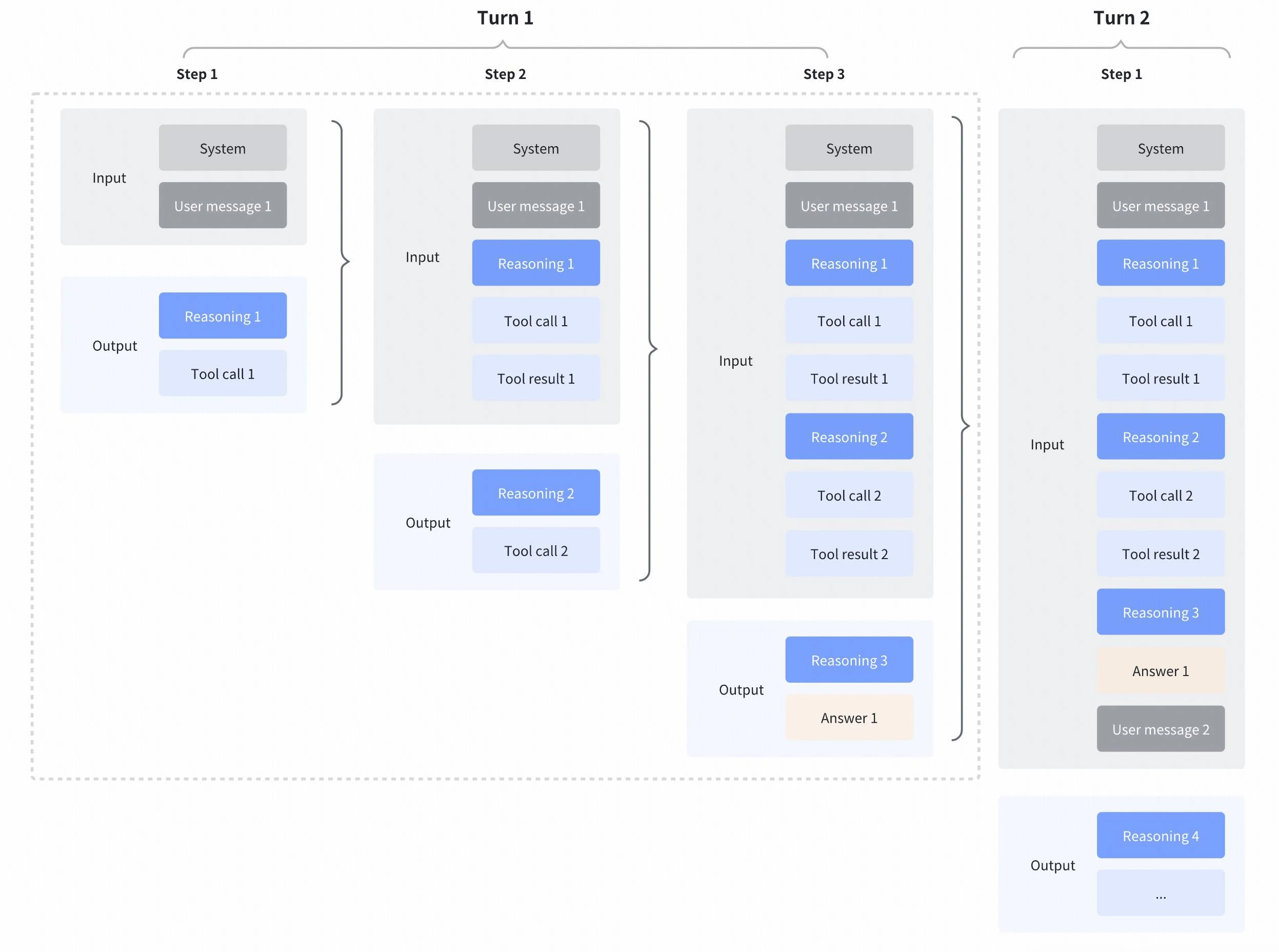 #### Controlling reasoning history
You can control how historical reasoning content is included in subsequent requests using the [`reasoning_history`](/api-reference/post-chatcompletions) parameter:
```python lines highlight={8} theme={null}
completion = client.chat.completions.create(
messages=[
{"role": "user", "content": "What is 15 + 27?"},
assistant_message, # Contains reasoning_content from previous turn
{"role": "user", "content": "Now multiply that by 2"},
],
model="accounts/fireworks/models/",
reasoning_history="preserved", # Retain all previous reasoning content
)
```
See the [`reasoning_history`](/api-reference/post-chatcompletions) parameter for all accepted values.
When `reasoning_history` is set to `"preserved"`, the model receives the full reasoning context from all previous turns. This is particularly useful for complex multi-turn conversations where maintaining reasoning continuity is important.
The following script demonstrates preserved thinking across multiple turns and validates that
`reasoning_content` from all previous turns is included in subsequent requests:
```python main.py expandable theme={null}
"""Test that reasoning_content is passed in multi-turn conversations.
This test proves that reasoning_content from previous turns is included
in subsequent requests by examining the raw prompt sent to the model.
"""
from fireworks import Fireworks
from dotenv import load_dotenv
load_dotenv()
client = Fireworks()
MODEL = "accounts/fireworks/models/glm-4p7"
# Define tools to enable interleaved thinking
tools = [
{
"type": "function",
"function": {
"name": "calculator",
"description": "Perform basic arithmetic operations",
"parameters": {
"type": "object",
"properties": {
"operation": {
"type": "string",
"enum": ["add", "subtract", "multiply", "divide"],
},
"a": {"type": "number"},
"b": {"type": "number"},
},
"required": ["operation", "a", "b"],
},
},
}
]
def print_header(title: str, char: str = "═", width: int = 60):
"""Print a formatted section header."""
print(f"\n{char * width}")
print(f" {title}")
print(f"{char * width}")
def print_field(label: str, value: str, indent: int = 2):
"""Print a labeled field with optional indentation."""
prefix = " " * indent
print(f"{prefix}{label}: {value}")
def print_multiline(label: str, content: str, max_preview: int = 200, indent: int = 2):
"""Print multiline content with a label and optional truncation."""
prefix = " " * indent
print(f"{prefix}{label}:")
preview = content[:max_preview] + "..." if len(content) > max_preview else content
for line in preview.split("\n"):
print(f"{prefix} │ {line}")
# First turn - get a response with reasoning_content
print_header("FIRST TURN", "═")
first_response = client.chat.completions.create(
messages=[
{
"role": "user",
"content": "What is 15 + 27?",
}
],
model=MODEL,
tools=tools,
)
print_field("📝 Content", first_response.choices[0].message.content or "(none)")
reasoning = first_response.choices[0].message.reasoning_content
print_multiline("💭 Reasoning", reasoning)
# Print tool call (verified) from the first response
tool_calls = first_response.choices[0].message.tool_calls
assert tool_calls, "No tool calls in first response!"
print(f"\n 🔧 Tool Calls ({len(tool_calls)}):")
for i, tc in enumerate(tool_calls, 1):
print(f" [{i}] id={tc.id}")
print(f" function={tc.function.name}")
print(f" arguments={tc.function.arguments}")
tool_call_id = first_response.choices[0].message.tool_calls[0].id
# Verify we got reasoning_content
assert reasoning and len(reasoning) > 0, "No reasoning_content in first response!"
print("\n ✓ First response has reasoning_content")
# Second turn - include the first assistant message
print_header("SECOND TURN", "═")
second_response = client.chat.completions.create(
messages=[
{
"role": "user",
"content": "What is 15 + 27?",
},
first_response.choices[0].message, # Includes reasoning_content
{"role": "tool", "content": "42", "tool_call_id": tool_call_id},
],
model=MODEL,
tools=tools,
raw_output=True,
)
print_field("📝 Answer", second_response.choices[0].message.content or "(none)")
# Extract and display the raw prompt that was sent to the model
raw_prompt = second_response.choices[0].raw_output.prompt_fragments[0]
print_header("RAW PROMPT SENT TO MODEL", "─")
print(raw_prompt)
# Check if reasoning_content from first turn is in the raw prompt
has_reasoning_content = reasoning[:50] in raw_prompt
print_header("RESULT", "═")
if has_reasoning_content:
print(" ✅ SUCCESS: reasoning_content IS included in subsequent requests!")
else:
print(" ❌ FAILED: reasoning_content not found in raw prompt")
print()
# Third turn - ask for another calculation
print_header("THIRD TURN", "═")
third_response = client.chat.completions.create(
messages=[
{
"role": "user",
"content": "What is 15 + 27?",
},
first_response.choices[0].message, # Includes reasoning_content
{"role": "tool", "content": "42", "tool_call_id": tool_call_id},
{
"role": "user",
"content": "What is 20 * 5?",
},
],
model=MODEL,
tools=tools,
)
print_field("📝 Answer", third_response.choices[0].message.content or "(none)")
reasoning_third = third_response.choices[0].message.reasoning_content
print_multiline("💭 Reasoning", reasoning_third)
# Print tool call from the third response
tool_calls_third = third_response.choices[0].message.tool_calls
assert tool_calls_third, "No tool calls in third response!"
print(f"\n 🔧 Tool Calls ({len(tool_calls_third)}):")
for i, tc in enumerate(tool_calls_third, 1):
print(f" [{i}] id={tc.id}")
print(f" function={tc.function.name}")
print(f" arguments={tc.function.arguments}")
tool_call_id_third = third_response.choices[0].message.tool_calls[0].id
print()
# Fourth turn - include the third assistant message and tool response
print_header("FOURTH TURN", "═")
fourth_response = client.chat.completions.create(
messages=[
{
"role": "user",
"content": "What is 15 + 27?",
},
first_response.choices[0].message, # Includes reasoning_content
{"role": "tool", "content": "42", "tool_call_id": tool_call_id},
{
"role": "user",
"content": "What is 20 * 5?",
},
third_response.choices[0].message, # Includes reasoning_content from third turn
{"role": "tool", "content": "100", "tool_call_id": tool_call_id_third},
],
model=MODEL,
tools=tools,
raw_output=True,
reasoning_history="preserved",
)
print_field("📝 Answer", fourth_response.choices[0].message.content or "(none)")
# Extract and display the raw prompt that was sent to the model
raw_prompt_fourth = fourth_response.choices[0].raw_output.prompt_fragments[0]
print_header("RAW PROMPT SENT TO MODEL (FOURTH TURN)", "─")
print(raw_prompt_fourth)
# Check if reasoning_content from both first and third turns are in the raw prompt
has_reasoning_content_first = reasoning[:50] in raw_prompt_fourth
has_reasoning_content_third = reasoning_third[:50] in raw_prompt_fourth
print_header("RESULT (FOURTH TURN)", "═")
if has_reasoning_content_first and has_reasoning_content_third:
print(
" ✅ SUCCESS: reasoning_content from both first and third turns IS included in fourth turn requests!"
)
elif has_reasoning_content_first:
print(" ⚠️ PARTIAL: Only first turn reasoning_content found in raw prompt")
elif has_reasoning_content_third:
print(" ⚠️ PARTIAL: Only third turn reasoning_content found in raw prompt")
else:
print(" ❌ FAILED: reasoning_content not found in raw prompt")
print()
```
Below is the expected output:
```txt GLM-4.7 (output) expandable theme={null}
════════════════════════════════════════════════════════════
FIRST TURN
════════════════════════════════════════════════════════════
📝 Content: (none)
💭 Reasoning:
│ The user is asking for the sum of 15 and 27. This is a simple arithmetic calculation that I can perform using the calculator function. I need to:
│
│ - Call the calculator function
│ - Set operation to "ad...
🔧 Tool Calls (1):
[1] id=call_6iGeMOel4nRUNw9B1UZlphUp
function=calculator
arguments={"operation": "add", "a": 15, "b": 27}
✓ First response has reasoning_content
════════════════════════════════════════════════════════════
SECOND TURN
════════════════════════════════════════════════════════════
📝 Answer: 15 + 27 = 42
────────────────────────────────────────────────────────────
RAW PROMPT SENT TO MODEL
────────────────────────────────────────────────────────────
[gMASK]<|system|>
# Tools
You may call one or more functions to assist with the user query.
You are provided with function signatures within XML tags:
{"type": "function", "function": {"name": "calculator", "description": "Perform basic arithmetic operations", "parameters": {"type": "object", "properties": {"operation": {"type": "string", "enum": ["add", "subtract", "multiply", "divide"]}, "a": {"type": "number"}, "b": {"type": "number"}}, "required": ["operation", "a", "b"]}}}
For each function call, output the function name and arguments within the following XML format:
{function-name}{arg-key-1}{arg-value-1}{arg-key-2}{arg-value-2}...<|user|>What is 15 + 27?<|assistant|>The user is asking for the sum of 15 and 27. This is a simple arithmetic calculation that I can perform using the calculator function. I need to:
- Call the calculator function
- Set operation to "add"
- Set a to 15
- Set b to 27
Let me make the function call.calculatoroperationadda15b27<|observation|>42<|assistant|>
════════════════════════════════════════════════════════════
RESULT
════════════════════════════════════════════════════════════
✅ SUCCESS: reasoning_content IS included in subsequent requests!
════════════════════════════════════════════════════════════
THIRD TURN
════════════════════════════════════════════════════════════
📝 Answer: (none)
💭 Reasoning:
│ The user is asking for 20 * 5. I need to use the calculator function with:
│ - operation: "multiply"
│ - a: 20
│ - b: 5
🔧 Tool Calls (1):
[1] id=call_s3VSYmOARo0gZUl0S4pai8jk
function=calculator
arguments={"operation": "multiply", "a": 20, "b": 5}
════════════════════════════════════════════════════════════
FOURTH TURN
════════════════════════════════════════════════════════════
📝 Answer: 100
────────────────────────────────────────────────────────────
RAW PROMPT SENT TO MODEL (FOURTH TURN)
────────────────────────────────────────────────────────────
[gMASK]<|system|>
# Tools
You may call one or more functions to assist with the user query.
You are provided with function signatures within XML tags:
{"type": "function", "function": {"name": "calculator", "description": "Perform basic arithmetic operations", "parameters": {"type": "object", "properties": {"operation": {"type": "string", "enum": ["add", "subtract", "multiply", "divide"]}, "a": {"type": "number"}, "b": {"type": "number"}}, "required": ["operation", "a", "b"]}}}
For each function call, output the function name and arguments within the following XML format:
{function-name}{arg-key-1}{arg-value-1}{arg-key-2}{arg-value-2}...<|user|>What is 15 + 27?<|assistant|>The user is asking for the sum of 15 and 27. This is a simple arithmetic calculation that I can perform using the calculator function. I need to:
- Call the calculator function
- Set operation to "add"
- Set a to 15
- Set b to 27
Let me make the function call.calculatoroperationadda15b27<|observation|>42<|user|>What is 20 * 5?<|assistant|>The user is asking for 20 * 5. I need to use the calculator function with:
- operation: "multiply"
- a: 20
- b: 5calculatoroperationmultiplya20b5<|observation|>100<|assistant|>
════════════════════════════════════════════════════════════
RESULT (FOURTH TURN)
════════════════════════════════════════════════════════════
✅ SUCCESS: reasoning_content from both first and third turns IS included in fourth turn requests!
```
#### Controlling reasoning history
You can control how historical reasoning content is included in subsequent requests using the [`reasoning_history`](/api-reference/post-chatcompletions) parameter:
```python lines highlight={8} theme={null}
completion = client.chat.completions.create(
messages=[
{"role": "user", "content": "What is 15 + 27?"},
assistant_message, # Contains reasoning_content from previous turn
{"role": "user", "content": "Now multiply that by 2"},
],
model="accounts/fireworks/models/",
reasoning_history="preserved", # Retain all previous reasoning content
)
```
See the [`reasoning_history`](/api-reference/post-chatcompletions) parameter for all accepted values.
When `reasoning_history` is set to `"preserved"`, the model receives the full reasoning context from all previous turns. This is particularly useful for complex multi-turn conversations where maintaining reasoning continuity is important.
The following script demonstrates preserved thinking across multiple turns and validates that
`reasoning_content` from all previous turns is included in subsequent requests:
```python main.py expandable theme={null}
"""Test that reasoning_content is passed in multi-turn conversations.
This test proves that reasoning_content from previous turns is included
in subsequent requests by examining the raw prompt sent to the model.
"""
from fireworks import Fireworks
from dotenv import load_dotenv
load_dotenv()
client = Fireworks()
MODEL = "accounts/fireworks/models/glm-4p7"
# Define tools to enable interleaved thinking
tools = [
{
"type": "function",
"function": {
"name": "calculator",
"description": "Perform basic arithmetic operations",
"parameters": {
"type": "object",
"properties": {
"operation": {
"type": "string",
"enum": ["add", "subtract", "multiply", "divide"],
},
"a": {"type": "number"},
"b": {"type": "number"},
},
"required": ["operation", "a", "b"],
},
},
}
]
def print_header(title: str, char: str = "═", width: int = 60):
"""Print a formatted section header."""
print(f"\n{char * width}")
print(f" {title}")
print(f"{char * width}")
def print_field(label: str, value: str, indent: int = 2):
"""Print a labeled field with optional indentation."""
prefix = " " * indent
print(f"{prefix}{label}: {value}")
def print_multiline(label: str, content: str, max_preview: int = 200, indent: int = 2):
"""Print multiline content with a label and optional truncation."""
prefix = " " * indent
print(f"{prefix}{label}:")
preview = content[:max_preview] + "..." if len(content) > max_preview else content
for line in preview.split("\n"):
print(f"{prefix} │ {line}")
# First turn - get a response with reasoning_content
print_header("FIRST TURN", "═")
first_response = client.chat.completions.create(
messages=[
{
"role": "user",
"content": "What is 15 + 27?",
}
],
model=MODEL,
tools=tools,
)
print_field("📝 Content", first_response.choices[0].message.content or "(none)")
reasoning = first_response.choices[0].message.reasoning_content
print_multiline("💭 Reasoning", reasoning)
# Print tool call (verified) from the first response
tool_calls = first_response.choices[0].message.tool_calls
assert tool_calls, "No tool calls in first response!"
print(f"\n 🔧 Tool Calls ({len(tool_calls)}):")
for i, tc in enumerate(tool_calls, 1):
print(f" [{i}] id={tc.id}")
print(f" function={tc.function.name}")
print(f" arguments={tc.function.arguments}")
tool_call_id = first_response.choices[0].message.tool_calls[0].id
# Verify we got reasoning_content
assert reasoning and len(reasoning) > 0, "No reasoning_content in first response!"
print("\n ✓ First response has reasoning_content")
# Second turn - include the first assistant message
print_header("SECOND TURN", "═")
second_response = client.chat.completions.create(
messages=[
{
"role": "user",
"content": "What is 15 + 27?",
},
first_response.choices[0].message, # Includes reasoning_content
{"role": "tool", "content": "42", "tool_call_id": tool_call_id},
],
model=MODEL,
tools=tools,
raw_output=True,
)
print_field("📝 Answer", second_response.choices[0].message.content or "(none)")
# Extract and display the raw prompt that was sent to the model
raw_prompt = second_response.choices[0].raw_output.prompt_fragments[0]
print_header("RAW PROMPT SENT TO MODEL", "─")
print(raw_prompt)
# Check if reasoning_content from first turn is in the raw prompt
has_reasoning_content = reasoning[:50] in raw_prompt
print_header("RESULT", "═")
if has_reasoning_content:
print(" ✅ SUCCESS: reasoning_content IS included in subsequent requests!")
else:
print(" ❌ FAILED: reasoning_content not found in raw prompt")
print()
# Third turn - ask for another calculation
print_header("THIRD TURN", "═")
third_response = client.chat.completions.create(
messages=[
{
"role": "user",
"content": "What is 15 + 27?",
},
first_response.choices[0].message, # Includes reasoning_content
{"role": "tool", "content": "42", "tool_call_id": tool_call_id},
{
"role": "user",
"content": "What is 20 * 5?",
},
],
model=MODEL,
tools=tools,
)
print_field("📝 Answer", third_response.choices[0].message.content or "(none)")
reasoning_third = third_response.choices[0].message.reasoning_content
print_multiline("💭 Reasoning", reasoning_third)
# Print tool call from the third response
tool_calls_third = third_response.choices[0].message.tool_calls
assert tool_calls_third, "No tool calls in third response!"
print(f"\n 🔧 Tool Calls ({len(tool_calls_third)}):")
for i, tc in enumerate(tool_calls_third, 1):
print(f" [{i}] id={tc.id}")
print(f" function={tc.function.name}")
print(f" arguments={tc.function.arguments}")
tool_call_id_third = third_response.choices[0].message.tool_calls[0].id
print()
# Fourth turn - include the third assistant message and tool response
print_header("FOURTH TURN", "═")
fourth_response = client.chat.completions.create(
messages=[
{
"role": "user",
"content": "What is 15 + 27?",
},
first_response.choices[0].message, # Includes reasoning_content
{"role": "tool", "content": "42", "tool_call_id": tool_call_id},
{
"role": "user",
"content": "What is 20 * 5?",
},
third_response.choices[0].message, # Includes reasoning_content from third turn
{"role": "tool", "content": "100", "tool_call_id": tool_call_id_third},
],
model=MODEL,
tools=tools,
raw_output=True,
reasoning_history="preserved",
)
print_field("📝 Answer", fourth_response.choices[0].message.content or "(none)")
# Extract and display the raw prompt that was sent to the model
raw_prompt_fourth = fourth_response.choices[0].raw_output.prompt_fragments[0]
print_header("RAW PROMPT SENT TO MODEL (FOURTH TURN)", "─")
print(raw_prompt_fourth)
# Check if reasoning_content from both first and third turns are in the raw prompt
has_reasoning_content_first = reasoning[:50] in raw_prompt_fourth
has_reasoning_content_third = reasoning_third[:50] in raw_prompt_fourth
print_header("RESULT (FOURTH TURN)", "═")
if has_reasoning_content_first and has_reasoning_content_third:
print(
" ✅ SUCCESS: reasoning_content from both first and third turns IS included in fourth turn requests!"
)
elif has_reasoning_content_first:
print(" ⚠️ PARTIAL: Only first turn reasoning_content found in raw prompt")
elif has_reasoning_content_third:
print(" ⚠️ PARTIAL: Only third turn reasoning_content found in raw prompt")
else:
print(" ❌ FAILED: reasoning_content not found in raw prompt")
print()
```
Below is the expected output:
```txt GLM-4.7 (output) expandable theme={null}
════════════════════════════════════════════════════════════
FIRST TURN
════════════════════════════════════════════════════════════
📝 Content: (none)
💭 Reasoning:
│ The user is asking for the sum of 15 and 27. This is a simple arithmetic calculation that I can perform using the calculator function. I need to:
│
│ - Call the calculator function
│ - Set operation to "ad...
🔧 Tool Calls (1):
[1] id=call_6iGeMOel4nRUNw9B1UZlphUp
function=calculator
arguments={"operation": "add", "a": 15, "b": 27}
✓ First response has reasoning_content
════════════════════════════════════════════════════════════
SECOND TURN
════════════════════════════════════════════════════════════
📝 Answer: 15 + 27 = 42
────────────────────────────────────────────────────────────
RAW PROMPT SENT TO MODEL
────────────────────────────────────────────────────────────
[gMASK]<|system|>
# Tools
You may call one or more functions to assist with the user query.
You are provided with function signatures within XML tags:
{"type": "function", "function": {"name": "calculator", "description": "Perform basic arithmetic operations", "parameters": {"type": "object", "properties": {"operation": {"type": "string", "enum": ["add", "subtract", "multiply", "divide"]}, "a": {"type": "number"}, "b": {"type": "number"}}, "required": ["operation", "a", "b"]}}}
For each function call, output the function name and arguments within the following XML format:
{function-name}{arg-key-1}{arg-value-1}{arg-key-2}{arg-value-2}...<|user|>What is 15 + 27?<|assistant|>The user is asking for the sum of 15 and 27. This is a simple arithmetic calculation that I can perform using the calculator function. I need to:
- Call the calculator function
- Set operation to "add"
- Set a to 15
- Set b to 27
Let me make the function call.calculatoroperationadda15b27<|observation|>42<|assistant|>
════════════════════════════════════════════════════════════
RESULT
════════════════════════════════════════════════════════════
✅ SUCCESS: reasoning_content IS included in subsequent requests!
════════════════════════════════════════════════════════════
THIRD TURN
════════════════════════════════════════════════════════════
📝 Answer: (none)
💭 Reasoning:
│ The user is asking for 20 * 5. I need to use the calculator function with:
│ - operation: "multiply"
│ - a: 20
│ - b: 5
🔧 Tool Calls (1):
[1] id=call_s3VSYmOARo0gZUl0S4pai8jk
function=calculator
arguments={"operation": "multiply", "a": 20, "b": 5}
════════════════════════════════════════════════════════════
FOURTH TURN
════════════════════════════════════════════════════════════
📝 Answer: 100
────────────────────────────────────────────────────────────
RAW PROMPT SENT TO MODEL (FOURTH TURN)
────────────────────────────────────────────────────────────
[gMASK]<|system|>
# Tools
You may call one or more functions to assist with the user query.
You are provided with function signatures within XML tags:
{"type": "function", "function": {"name": "calculator", "description": "Perform basic arithmetic operations", "parameters": {"type": "object", "properties": {"operation": {"type": "string", "enum": ["add", "subtract", "multiply", "divide"]}, "a": {"type": "number"}, "b": {"type": "number"}}, "required": ["operation", "a", "b"]}}}
For each function call, output the function name and arguments within the following XML format:
{function-name}{arg-key-1}{arg-value-1}{arg-key-2}{arg-value-2}...<|user|>What is 15 + 27?<|assistant|>The user is asking for the sum of 15 and 27. This is a simple arithmetic calculation that I can perform using the calculator function. I need to:
- Call the calculator function
- Set operation to "add"
- Set a to 15
- Set b to 27
Let me make the function call.calculatoroperationadda15b27<|observation|>42<|user|>What is 20 * 5?<|assistant|>The user is asking for 20 * 5. I need to use the calculator function with:
- operation: "multiply"
- a: 20
- b: 5calculatoroperationmultiplya20b5<|observation|>100<|assistant|>
════════════════════════════════════════════════════════════
RESULT (FOURTH TURN)
════════════════════════════════════════════════════════════
✅ SUCCESS: reasoning_content from both first and third turns IS included in fourth turn requests!
```