
Quick start
1. Install from Bash (Node.js 18 or later):status shows the configured model and which Fireworks models appear in the picker.
Replace claude with a supported harness name from Coding Harnesses. cursor means Cursor IDE only; Cursor CLI is not supported.
Windows: run the install command from Git Bash. PowerShell breaks the install script line endings.
In Claude Code
When you select FireRouter in Claude Code, the header shows the active profile:
Claude Code connected through FireRouter
/model to choose FireRouter, an open-model router, or a Fireworks model:
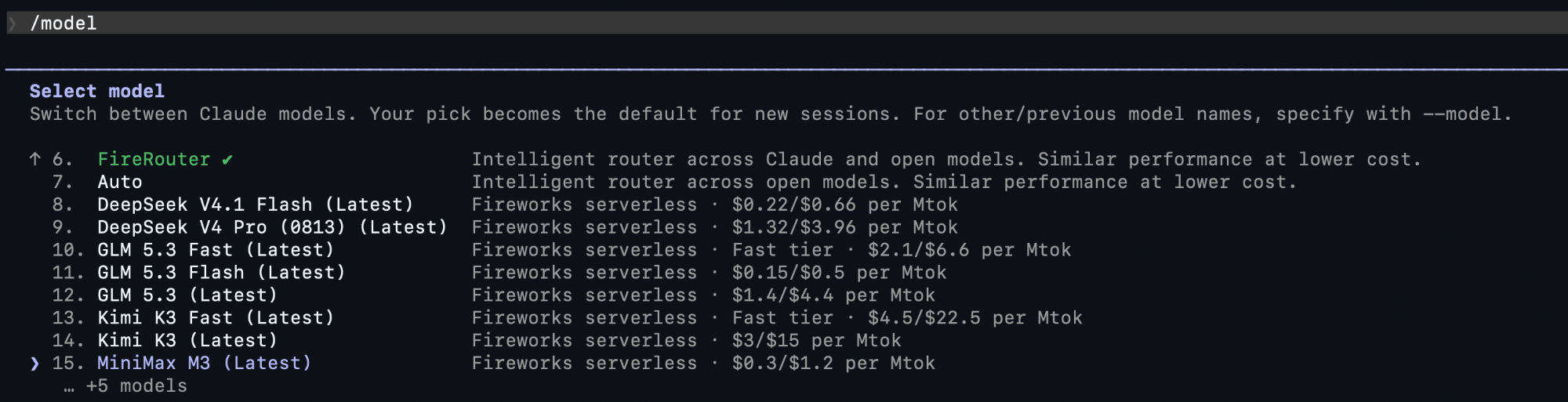
Fireworks models and routers in the Claude Code model picker
Connect and restore
- Connect rewrites the harness config to call Fireworks and saves a snapshot under
~/.fireconnect/. offrestores file-based harnesses from that snapshot byte-for-byte. For IDE databases, it removes the settings and models FireConnect added.- Sign-in credentials and harness configurations are stored separately.
fireconnect loginsaves your credential through FireConnect’s secret store. If a harness requires the key in its own configuration, FireConnect copies it there and restricts the file permissions. Runfireconnect statusto see the active storage backend without revealing the key.
Choose a model
Connecting registers coding-ready Fireworks models, includingauto. Use --model only when you want to add or select an explicit model: