> ## Documentation Index
> Fetch the complete documentation index at: https://docs.fireworks.ai/llms.txt
> Use this file to discover all available pages before exploring further.
# Single-Turn Training Quickstart
> Train a model to be an expert at answering GSM8K math questions
**Reinforcement Fine-Tuning (RFT)** is free for models under 16B parameters. When creating an RFT job in the UI, filter for free tuning models in the model selection area on the [fine-tuning creation page](https://app.fireworks.ai/dashboard/fine-tuning/create). If kicking off jobs from the terminal, you can find the model ID from the [Model Library](https://app.fireworks.ai/models?filter=LLM\&tunable=true). Note: SFT and DPO jobs are billed per training token for all model sizes—see the [pricing page](https://fireworks.ai/pricing) for details.
**Following the [RFT Overview](/fine-tuning/reinforcement-fine-tuning-models)?** This is the **Single-Turn Training** path—the fastest way to get started with RFT.
In this quickstart, you'll train a small language model—`Qwen3 0.6B`—to solve mathematical reasoning problems from the GSM8K dataset.
## What you'll learn
* How to set up and test an evaluator locally, using the Eval Protocol SDK
* How to take that evaluator and use it in an RFT job, from the command line
* How to monitor training progress and evaluate accuracy improvements
Prefer a notebook experience? You can also [run this tutorial in Google Colab](https://colab.research.google.com/drive/16xrb9rx6AoAEOtrDXumzo71HjhunaoPi#scrollTo=CP18QX4tgi-0). Note that Colab requires billing enabled on your Google account.
## Prerequisites
* Python 3.10+
* A Fireworks API key (stored in your shell or .env)
* Command-line access (terminal or shell)
## 1. Install dependencies and set up files
Clone the quickstart-gsm8k repository and install dependencies:
```bash theme={null}
git clone https://github.com/eval-protocol/quickstart-gsm8k.git
cd quickstart-gsm8k
pip install -r requirements.txt
```
Create the `gsm8k_artifacts/` folder structure and copy files:
```bash theme={null}
mkdir -p gsm8k_artifacts/{tests/pytest/gsm8k,development}
cp evaluation.py gsm8k_artifacts/tests/pytest/gsm8k/test_pytest_math_example.py
cp gsm8k_sample.jsonl gsm8k_artifacts/development/gsm8k_sample.jsonl
```
The repository includes:
* **Evaluator** (`evaluation.py`): Defines how to evaluate math answers
* **Dataset** (`gsm8k_sample.jsonl`): Contains example math problems to test on
Install the latest `eval-protocol` SDK, `pytest`, and `requests`:
```bash theme={null}
python -m pip install --upgrade pip
python -m pip install pytest requests git+https://github.com/eval-protocol/python-sdk.git
```
Download the evaluator and dataset files:
Run this Python script to download two files from the Eval Protocol repository into a folder on your machine called `gsm8k_artifacts/`.
* **Test script** (`test_pytest_math_example.py`): Defines how to evaluate math answers
* **Sample dataset** (`gsm8k_sample.jsonl`): Contains example math problems to test on
```python tutorial/download_gsm8k_assets.py theme={null}
from pathlib import Path
import requests
ARTIFACT_ROOT = Path("gsm8k_artifacts")
TEST_PATH = ARTIFACT_ROOT / "tests" / "pytest" / "gsm8k" / "test_pytest_math_example.py"
DATASET_PATH = ARTIFACT_ROOT / "development" / "gsm8k_sample.jsonl"
files_to_download = {
TEST_PATH: "https://raw.githubusercontent.com/eval-protocol/python-sdk/main/tests/pytest/gsm8k/test_pytest_math_example.py",
DATASET_PATH: "https://raw.githubusercontent.com/eval-protocol/python-sdk/main/development/gsm8k_sample.jsonl",
}
for local_path, url in files_to_download.items():
local_path.parent.mkdir(parents=True, exist_ok=True)
response = requests.get(url, timeout=30)
response.raise_for_status()
local_path.write_bytes(response.content)
print(f"Saved {url} -> {local_path}")
```
Expected output:
```
Saved https://raw.githubusercontent.com/.../test_pytest_math_example.py -> gsm8k_artifacts/tests/pytest/gsm8k/test_pytest_math_example.py
Saved https://raw.githubusercontent.com/.../gsm8k_sample.jsonl -> gsm8k_artifacts/development/gsm8k_sample.jsonl
```
## 2. Test your evaluator locally
In this step, we will test your evaluator by examining the output locally. Feel free to iterate on the evaluator you downloaded in the last step until it gives the output you want.
Open a terminal and run:
```bash theme={null}
ep logs
```
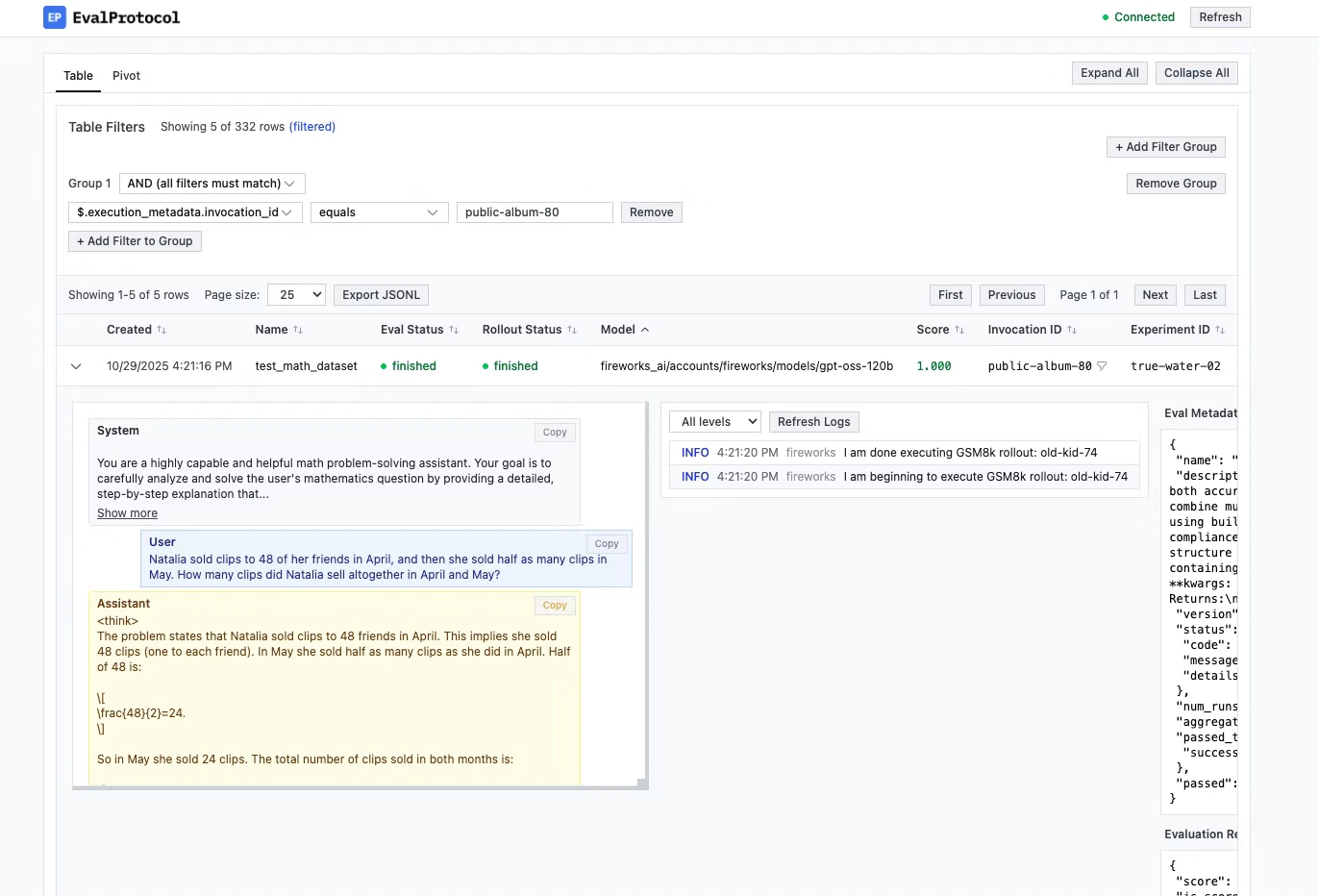
This will start a local server, navigate to `http://localhost:8000`. Keep this terminal running.
In a **new terminal**, call the test script to run the evaluator on your dataset of sample math problems.
```bash theme={null}
cd gsm8k_artifacts
ep local-test
```
This command discovers and runs your `@evaluation_test` with pytest.
As the test runs, you'll see evaluation scores appear in the browser, with detailed logs for each problem the model attempts. `pytest` will also register your evaluator and dataset with Fireworks automatically, so you can use them in the next step for RFT.
 ## 3. Start training
First, set your Fireworks API key so the Fireworks CLI can authenticate you:
```bash theme={null}
export FIREWORKS_API_KEY=""
```
Next, we'll launch the RFT job using the evaluator and dataset you just registered. We're using a small base model (`qwen3-0p6b`) to keep training fast and inexpensive. Because your evaluator and dataset were already registered with Fireworks in the last step, we don't need to specify them again here.
```bash theme={null}
cd ..
eval-protocol create rft
--base-model accounts/fireworks/models/qwen3-0p6b
```
The CLI will output dashboard links where you can monitor your training job in real-time.
## 3. Start training
First, set your Fireworks API key so the Fireworks CLI can authenticate you:
```bash theme={null}
export FIREWORKS_API_KEY=""
```
Next, we'll launch the RFT job using the evaluator and dataset you just registered. We're using a small base model (`qwen3-0p6b`) to keep training fast and inexpensive. Because your evaluator and dataset were already registered with Fireworks in the last step, we don't need to specify them again here.
```bash theme={null}
cd ..
eval-protocol create rft
--base-model accounts/fireworks/models/qwen3-0p6b
```
The CLI will output dashboard links where you can monitor your training job in real-time.
 You can also store your API key in a `.env` file instead of exporting it each session.
## Monitor your training progress
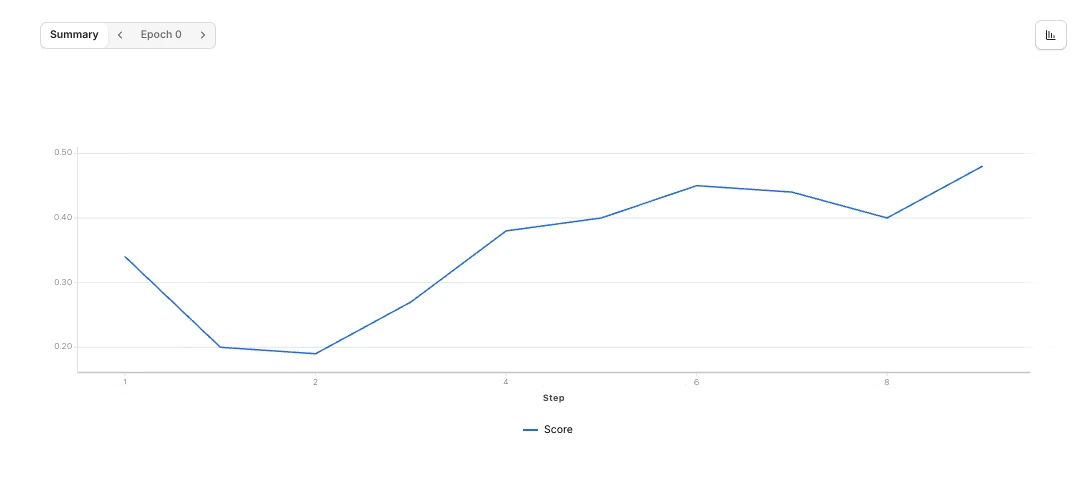
Your RFT job is now running. You can monitor progress in the dashboard links provided by the CLI output.
Re-run the pytest evaluation command to measure your model's performance on new checkpoints:
```bash theme={null}
cd gsm8k_artifacts
pytest -q tests/pytest/gsm8k/test_pytest_math_example.py::test_math_dataset -s
```
This helps you see how your model's accuracy improves over time and decide when to stop training.
You can adjust the evaluation logic to better fit your needs:
* **Modify reward shaping**: Edit the scoring logic in `test_pytest_math_example.py` to match your answer format expectations
* **Use your own data**: Replace the sample dataset by either editing the JSONL file locally or passing `--dataset-jsonl` when creating the RFT job
### What's happening behind the scenes
Understanding the training workflow:
1. **Evaluation registration**: The pytest script evaluates a small GSM8K subset using numeric answer checking, then automatically registers both your evaluator and dataset with Fireworks
2. **RFT job creation**: The `create rft` command connects your registered evaluator and dataset to a Reinforcement Fine-Tuning job for your chosen base model
3. **Continuous improvement**: As training progresses, evaluation scores on the held-out set reflect improved accuracy, allowing you to iterate quickly before scaling to larger experiments
## Next steps
Learn all CLI options to customize your training parameters
Train agents that run in your production infrastructure
Understand how reinforcement fine-tuning works
You can also store your API key in a `.env` file instead of exporting it each session.
## Monitor your training progress
Your RFT job is now running. You can monitor progress in the dashboard links provided by the CLI output.
Re-run the pytest evaluation command to measure your model's performance on new checkpoints:
```bash theme={null}
cd gsm8k_artifacts
pytest -q tests/pytest/gsm8k/test_pytest_math_example.py::test_math_dataset -s
```
This helps you see how your model's accuracy improves over time and decide when to stop training.
You can adjust the evaluation logic to better fit your needs:
* **Modify reward shaping**: Edit the scoring logic in `test_pytest_math_example.py` to match your answer format expectations
* **Use your own data**: Replace the sample dataset by either editing the JSONL file locally or passing `--dataset-jsonl` when creating the RFT job
### What's happening behind the scenes
Understanding the training workflow:
1. **Evaluation registration**: The pytest script evaluates a small GSM8K subset using numeric answer checking, then automatically registers both your evaluator and dataset with Fireworks
2. **RFT job creation**: The `create rft` command connects your registered evaluator and dataset to a Reinforcement Fine-Tuning job for your chosen base model
3. **Continuous improvement**: As training progresses, evaluation scores on the held-out set reflect improved accuracy, allowing you to iterate quickly before scaling to larger experiments
## Next steps
Learn all CLI options to customize your training parameters
Train agents that run in your production infrastructure
Understand how reinforcement fine-tuning works