> ## Documentation Index
> Fetch the complete documentation index at: https://docs.fireworks.ai/llms.txt
> Use this file to discover all available pages before exploring further.
# Monitor Training
> Track RFT job progress and diagnose issues in real-time
Once your RFT job is running, the Fireworks dashboard provides comprehensive monitoring tools to track progress, inspect individual rollouts, and debug issues as they arise.
## Accessing the monitoring dashboard
After creating your RFT job, you'll receive a dashboard link in the CLI output:
```
Dashboard Links:
RFT Job: https://app.fireworks.ai/dashboard/fine-tuning/reinforcement/abc123
```
Click this link or navigate manually:
1. Go to [Fireworks Dashboard](https://app.fireworks.ai)
2. Click **Fine-Tuning** in the sidebar
3. Select your job from the list
## Understanding the overview
The main dashboard shows your job's current state and key metrics.
### Job status
Your job is queued waiting for GPU resources. Queue time depends on current demand and your account priority.
**Action**: None needed. Job will start automatically when resources become available.
Fireworks is validating your dataset to ensure it meets format requirements and quality standards.
**Duration**: Typically 1-2 minutes
**Action**: None needed. If validation fails, you'll receive specific error messages about issues in your dataset.
Training is actively in progress. Rollouts are being generated, evaluated, and the model is learning.
**Action**: Monitor metrics and rollout quality. This is when you'll watch reward curves improve.
Training finished successfully. Your fine-tuned model is ready for deployment.
**Action**: Review final metrics, then [deploy your model](/fine-tuning/deploying-loras).
Training encountered an unrecoverable error and stopped.
**Action**: Check error logs and troubleshooting section below. Common causes include evaluator errors, resource limits, or dataset issues.
You or another user manually stopped the job.
**Action**: Review partial results if needed. Create a new job to continue training.
Training stopped automatically because the full epoch showed no improvement. All rollouts received the same scores, indicating no training progress.
**Action**: This typically indicates an issue with your evaluator or training setup. Check that:
* Your evaluator is returning varied scores (not all 0s or all 1s)
* The reward function can distinguish between good and bad outputs
* The model is actually generating different responses
Review the troubleshooting section below for common causes.
### Key metrics at a glance
The overview panel displays:
* **Elapsed time**: How long the job has been running
* **Progress**: Current epoch and step counts
* **Reward**: Latest mean reward from rollouts
* **Model**: Base model and output model names
## Training metrics
### Reward curves
The most important metric in RFT is the reward curve, which shows how well your model is performing over time.
**What to look for**:
* **Upward trend** - Model is learning and improving
* **Plateauing** - Model may have converged; consider stopping or adjusting parameters
* **Decline** - Potential issue with evaluator or training instability
* **Spikes** - Could indicate noisy rewards or outliers in evaluation
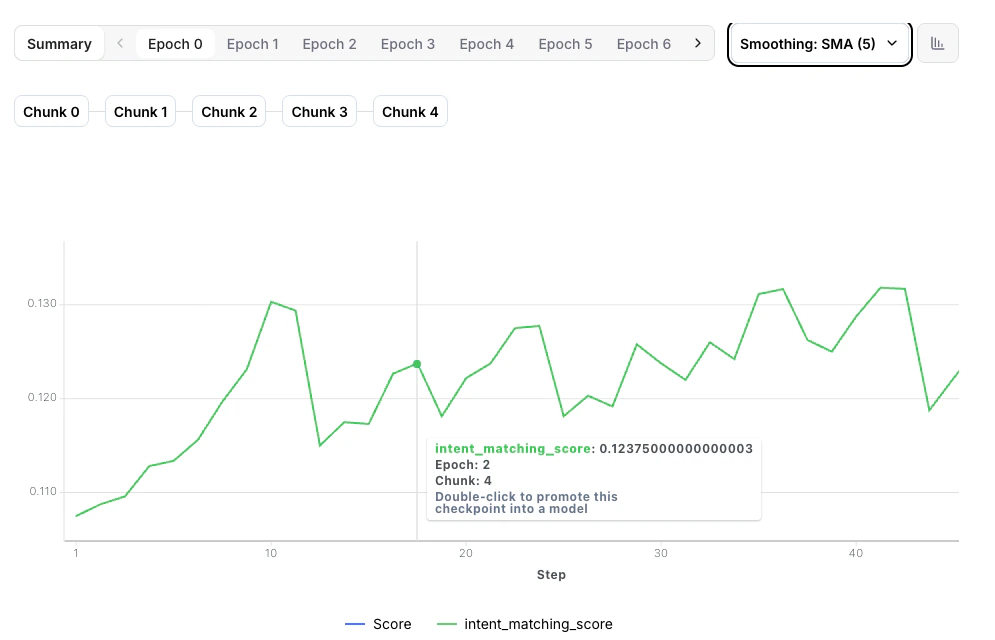 Healthy training shows steady reward improvement. Don't worry about minor fluctuations—focus on the overall trend.
### Training loss
Loss measures how well the model is fitting the training data:
* **Decreasing loss** - Normal learning behavior
* **Increasing loss** - Learning rate may be too high
* **Flat loss** - Model may not be learning; check evaluator rewards
### Evaluation metrics
If you provided an evaluation dataset, you'll see validation metrics:
* **Eval reward**: Model performance on held-out data
* **Generalization gap**: Difference between training and eval rewards
Large gaps between training and eval rewards suggest overfitting. Consider reducing epochs or adding more diverse training data.
## Inspecting rollouts
Understanding individual rollouts helps you verify your evaluator is working correctly and identify quality issues.
### Rollout overview table
Click any **Epoch** in the training timeline, then click the **table icon** to view all rollouts for that step.
Healthy training shows steady reward improvement. Don't worry about minor fluctuations—focus on the overall trend.
### Training loss
Loss measures how well the model is fitting the training data:
* **Decreasing loss** - Normal learning behavior
* **Increasing loss** - Learning rate may be too high
* **Flat loss** - Model may not be learning; check evaluator rewards
### Evaluation metrics
If you provided an evaluation dataset, you'll see validation metrics:
* **Eval reward**: Model performance on held-out data
* **Generalization gap**: Difference between training and eval rewards
Large gaps between training and eval rewards suggest overfitting. Consider reducing epochs or adding more diverse training data.
## Inspecting rollouts
Understanding individual rollouts helps you verify your evaluator is working correctly and identify quality issues.
### Rollout overview table
Click any **Epoch** in the training timeline, then click the **table icon** to view all rollouts for that step.
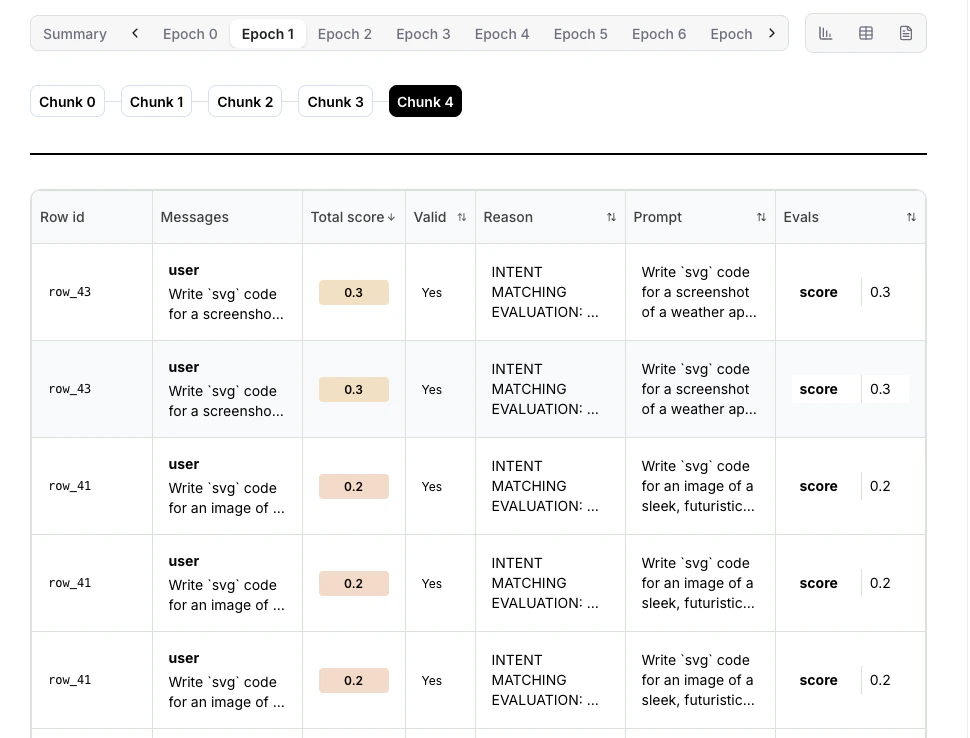 The table shows:
* **Row ID**: Unique identifier for each dataset row used in this rollout
* **Prompt**: The input prompt sent to the model
* **Messages**: The model's generated response messages
* **Valid**: Whether the rollout completed successfully without errors
* **Reason**: Explanation if the rollout failed or was marked invalid
* **Score**: Reward score assigned by your evaluator (0.0 to 1.0)
**What to check**:
* Most rollouts succeeding (status: complete)
* Reward distribution makes sense (high for good outputs, low for bad)
* Many failures indicate evaluator issues
* All rewards identical may indicate evaluator is broken
### Individual rollout details
Click any row in the rollout table to see full details:
The table shows:
* **Row ID**: Unique identifier for each dataset row used in this rollout
* **Prompt**: The input prompt sent to the model
* **Messages**: The model's generated response messages
* **Valid**: Whether the rollout completed successfully without errors
* **Reason**: Explanation if the rollout failed or was marked invalid
* **Score**: Reward score assigned by your evaluator (0.0 to 1.0)
**What to check**:
* Most rollouts succeeding (status: complete)
* Reward distribution makes sense (high for good outputs, low for bad)
* Many failures indicate evaluator issues
* All rewards identical may indicate evaluator is broken
### Individual rollout details
Click any row in the rollout table to see full details:
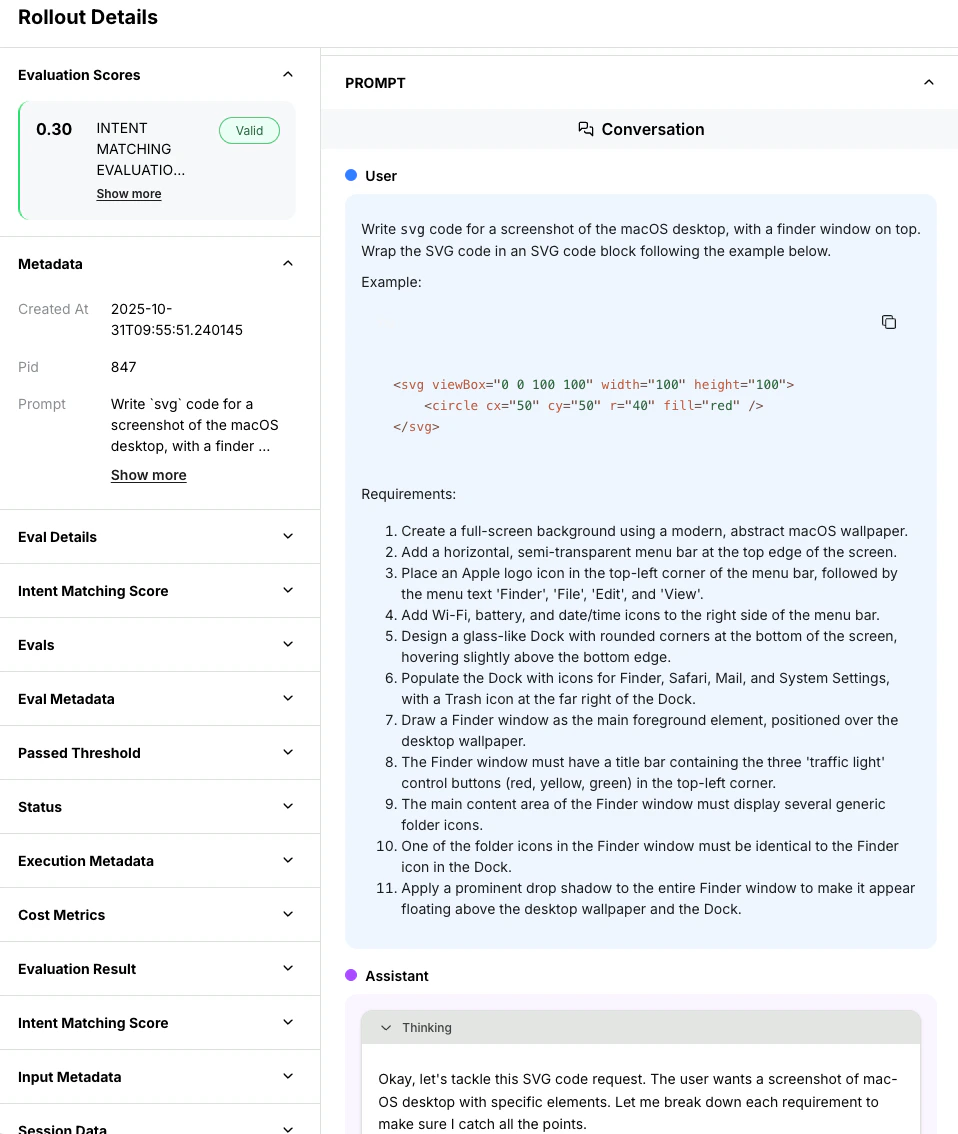 You'll see:
1. **Full prompt**: Exact messages sent to the model
2. **Model response**: Complete generated output
3. **Evaluation result**: Reward score and reasoning (if provided)
4. **Metadata**: Token counts, timing, temperature settings
5. **Tool calls**: For agentic rollouts with function calling
Copy and paste model outputs to test them manually. For example, if you're training a code generator, try running the generated code yourself to verify your evaluator is scoring correctly.
### Quality spot checks
Regularly inspect rollouts at different stages of training:
**Early training (first epoch)**:
* Verify evaluator is working correctly
* Check that high-reward rollouts are actually good
* Ensure low-reward rollouts are actually bad
**Mid-training**:
* Confirm model quality is improving
* Look for new strategies or behaviors emerging
* Check that evaluator isn't being gamed
**Late training**:
* Verify final model quality meets your standards
* Check for signs of overfitting (memorizing training data)
* Ensure diversity in responses (not all identical)
## Live logs
Real-time logs show what's happening inside your training job.
### Accessing logs
Click the **Logs icon** next to the table icon to view real-time logs for your training job.
You'll see:
1. **Full prompt**: Exact messages sent to the model
2. **Model response**: Complete generated output
3. **Evaluation result**: Reward score and reasoning (if provided)
4. **Metadata**: Token counts, timing, temperature settings
5. **Tool calls**: For agentic rollouts with function calling
Copy and paste model outputs to test them manually. For example, if you're training a code generator, try running the generated code yourself to verify your evaluator is scoring correctly.
### Quality spot checks
Regularly inspect rollouts at different stages of training:
**Early training (first epoch)**:
* Verify evaluator is working correctly
* Check that high-reward rollouts are actually good
* Ensure low-reward rollouts are actually bad
**Mid-training**:
* Confirm model quality is improving
* Look for new strategies or behaviors emerging
* Check that evaluator isn't being gamed
**Late training**:
* Verify final model quality meets your standards
* Check for signs of overfitting (memorizing training data)
* Ensure diversity in responses (not all identical)
## Live logs
Real-time logs show what's happening inside your training job.
### Accessing logs
Click the **Logs icon** next to the table icon to view real-time logs for your training job.
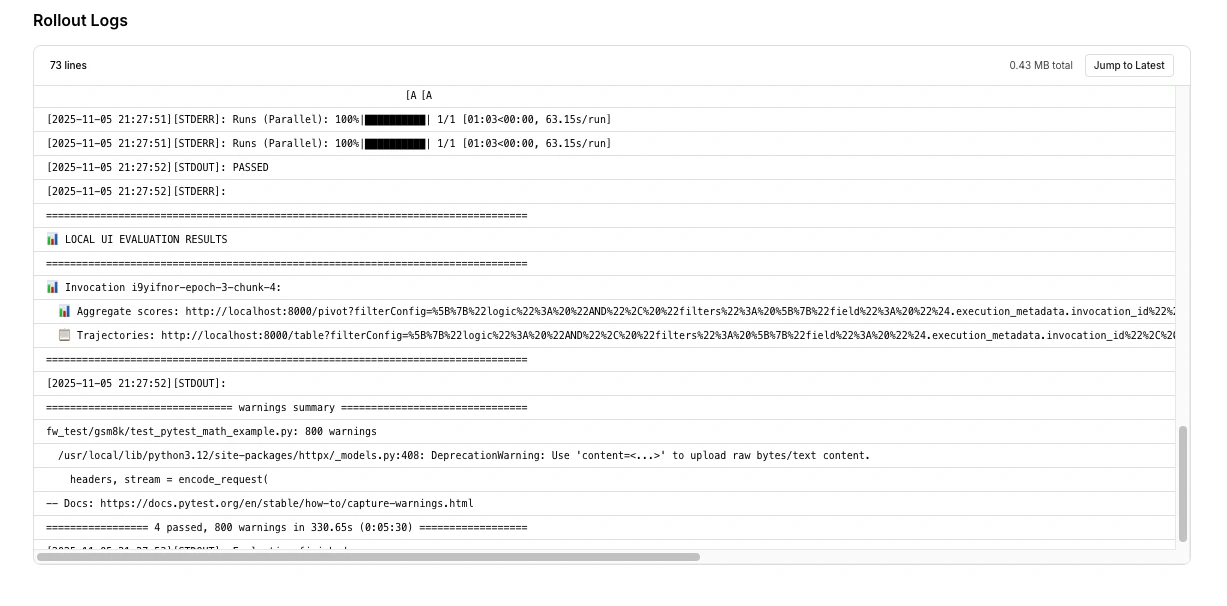 ### Using logs for debugging
When things go wrong, logs are your first stop:
1. **Filter by error level**: Focus on `[ERROR]` and `[WARNING]` messages
2. **Search for rollout IDs**: Track specific rollouts through their lifecycle
3. **Look for patterns**: Repeated errors indicate systematic issues
4. **Check timestamps**: Correlate errors with metric changes
## Training diagnostics
### Available in the managed flow
The managed RFT dashboard provides:
* **Reward curves:** Mean reward over training steps
* **Training loss:** Policy loss over time
* **Rollout inspection:** Individual rollouts with scores, messages, and metadata
### Traces page
The **Traces** page in the Fireworks dashboard provides per-rollout execution traces, including timing, token counts, and evaluation results. Trace data can be downloaded for offline analysis using the download button on the Traces page.
### Metrics not directly surfaced
The following diagnostics are not directly surfaced in the managed RFT dashboard today:
* **Filtering rates:** How many zero-variance groups were dropped per iteration
* **Effective batch size:** Actual number of training groups after filtering
* **Advantage magnitude and distribution:** Per-step advantage statistics
* **KL divergence:** Distance between the current policy and the reference model
* **Per-token importance sampling ratios:** Clipping frequency and magnitude
These metrics can be partially inferred from trace data and rollout inspection. For richer per-step diagnostics, consider using the [Training API](/fine-tuning/training-api/introduction), which gives you full Python control over the training loop and allows you to log any metric you need.
## Common issues and solutions
**Symptoms**: Reward curve flat or very low throughout training
**Possible causes**:
* Evaluator always returning 0 or very low scores
* Model outputs not matching expected format
* Task too difficult for base model
**Solutions**:
1. Inspect rollouts to verify evaluator is working:
* Check that some rollouts get high rewards
* Verify reward logic makes sense
2. Test evaluator locally on known good/bad outputs
3. Simplify the task or provide more examples
4. Try a stronger base model
**Symptoms**: Reward increases then crashes and stays low
**Possible causes**:
* Learning rate too high causing training instability
* Model found an exploit in the evaluator (reward hacking)
* Catastrophic forgetting
**Solutions**:
1. Stop training and use the last good checkpoint
2. Restart with lower learning rate (e.g., `--learning-rate 5e-5`)
3. Review recent rollouts for reward hacking behavior
4. Improve evaluator to be more robust
**Symptoms**: Rollout table shows lots of errors or timeouts
**Possible causes**:
* Evaluator code errors
* Timeout too short for evaluation
* External API failures (for remote evaluators)
* Resource exhaustion
**Solutions**:
1. Check error logs for specific error messages
2. Test evaluator locally to reproduce errors
3. Increase `--rollout-timeout` if evaluations need more time
4. Add better error handling in evaluator code
5. For remote evaluators: check server health and logs
**Symptoms**: Loss goes up instead of down
**Possible causes**:
* Learning rate too high
* Conflicting reward signals
* Numerical instability
**Solutions**:
1. Reduce learning rate by 2-5x
2. Check that rewards are consistent (same prompt gets similar rewards)
3. Verify rewards are in valid range \[0, 1]
4. Consider reducing batch size
**Symptoms**: Model generates the same response for every prompt
**Possible causes**:
* Temperature too low (near 0)
* Model found one high-reward response and overfit to it
* Evaluator only rewards one specific output
**Solutions**:
1. Increase `--temperature` to 0.8-1.0
2. Make evaluator more flexible to accept diverse good answers
3. Use more diverse prompts in training data
4. Reduce epochs to prevent overfitting
**Symptoms**: Many rollouts timing out with remote environment
**Possible causes**:
* Remote server slow or overloaded
* Network latency issues
* Evaluator not logging completion correctly
**Solutions**:
1. Check remote server logs for errors
2. Verify server is logging `Status.rollout_finished()`
3. Increase `--rollout-timeout` to allow more time
4. Scale remote server to handle concurrent requests
5. Optimize evaluator code for performance
## Performance optimization
### Speeding up training
If training is slower than expected:
**Slow evaluators directly increase training time**:
* Profile your evaluator code to find bottlenecks
* Cache expensive computations
* Use batch processing for API calls
* Add timeouts to prevent hanging
**For remote evaluators**:
* Add more worker instances to handle concurrent rollouts
* Use faster machines (more CPU, memory)
* Optimize network connectivity to Fireworks
Target: Evaluations should complete in 1-5 seconds per rollout.
**Reduce compute while maintaining quality**:
* Decrease `--n` (e.g., from 8 to 4 rollouts per prompt)
* Reduce `--max-tokens` if responses don't need to be long
* Lower temperature slightly to speed up sampling
Caution: Too few rollouts (n \< 4) may hurt training quality.
### Cost optimization
Reduce costs without sacrificing too much quality:
1. **Start small**: Experiment with `qwen3-0p6b` before scaling to larger models
2. **Reduce rollouts**: Use `--n 4` instead of 8
3. **Shorter responses**: Lower `--max-tokens` to minimum needed
4. **Fewer epochs**: Start with 1 epoch, only add more if needed
5. **Efficient evaluators**: Minimize API calls and computation
## Stopping and resuming jobs
### Stopping a running job
If you need to stop training:
1. Click **Cancel Job** in the dashboard
2. Or via CLI:
```bash theme={null}
firectl rftj delete
```
The model state at the last checkpoint is saved and can be deployed.
Cancelled jobs cannot be resumed. If you want to continue training, create a new job starting from the last checkpoint.
### Using checkpoints
Checkpoints are automatically saved during training. To continue from a checkpoint:
```bash theme={null}
eval-protocol create rft \
--warm-start-from accounts/your-account/models/previous-checkpoint \
--output-model continued-training
```
This is useful for:
* Extending training after early stopping
* Trying different hyperparameters on a trained model
* Building on previous successful training runs
## Comparing multiple jobs
Running multiple experiments? Compare them side-by-side:
1. Navigate to **Fine-Tuning** dashboard
2. Select multiple jobs using checkboxes
3. Click **Compare**
This shows:
* Reward curves overlaid on same graph
* Parameter differences highlighted
* Final metrics comparison
* Training time and cost comparison
Use consistent naming for experiments (e.g., `math-lr-1e4`, `math-lr-5e5`) to make comparisons easier.
## Exporting metrics
For deeper analysis or paper writing:
### Via dashboard
1. Click **Export** button in job view
2. Choose format: CSV, JSON
3. Select metrics to export (rewards, loss, rollout data)
### Via API
```python theme={null}
import requests
response = requests.get(
f"https://api.fireworks.ai/v1/accounts/{account}/reinforcementFineTuningJobs/{job_id}/metrics",
headers={"Authorization": f"Bearer {api_key}"}
)
metrics = response.json()
```
### Weights & Biases integration
If you enabled W\&B when creating the job:
```bash theme={null}
eval-protocol create rft \
--wandb-project my-experiments \
--wandb-entity my-org \
...
```
All metrics automatically sync to W\&B for advanced analysis, comparison, and sharing.
## Best practices
Check your job within the first 15-30 minutes of training:
* Verify evaluator is working correctly
* Confirm rewards are in expected range
* Catch configuration errors early
Don't wait until training completes to discover issues.
Every few epochs, inspect 5-10 random rollouts:
* Manually verify high-reward outputs are actually good
* Check low-reward outputs are actually bad
* Look for unexpected model behaviors
This catches evaluator bugs and reward hacking.
When you find good hyperparameters, save the command:
```bash theme={null}
# Save to file for reproducibility
echo "eval-protocol create rft --base-model ... --learning-rate 5e-5 ..." > best_config.sh
```
Makes it easy to reproduce results or share with team.
Name jobs descriptively:
* Good: `math-solver-llama8b-temp08-n8`
* Bad: `test1`, `try2`, `final-final`
Future you will thank you when comparing experiments.
Keep notes on what worked and what didn't:
* Hypothesis for each experiment
* Parameters changed
* Results and insights
* Next steps
Build institutional knowledge for your team.
## Next steps
Once training completes, deploy your fine-tuned model for inference
Learn how to adjust parameters for better results
Improve your reward functions based on training insights
Start a new experiment using the CLI
### Using logs for debugging
When things go wrong, logs are your first stop:
1. **Filter by error level**: Focus on `[ERROR]` and `[WARNING]` messages
2. **Search for rollout IDs**: Track specific rollouts through their lifecycle
3. **Look for patterns**: Repeated errors indicate systematic issues
4. **Check timestamps**: Correlate errors with metric changes
## Training diagnostics
### Available in the managed flow
The managed RFT dashboard provides:
* **Reward curves:** Mean reward over training steps
* **Training loss:** Policy loss over time
* **Rollout inspection:** Individual rollouts with scores, messages, and metadata
### Traces page
The **Traces** page in the Fireworks dashboard provides per-rollout execution traces, including timing, token counts, and evaluation results. Trace data can be downloaded for offline analysis using the download button on the Traces page.
### Metrics not directly surfaced
The following diagnostics are not directly surfaced in the managed RFT dashboard today:
* **Filtering rates:** How many zero-variance groups were dropped per iteration
* **Effective batch size:** Actual number of training groups after filtering
* **Advantage magnitude and distribution:** Per-step advantage statistics
* **KL divergence:** Distance between the current policy and the reference model
* **Per-token importance sampling ratios:** Clipping frequency and magnitude
These metrics can be partially inferred from trace data and rollout inspection. For richer per-step diagnostics, consider using the [Training API](/fine-tuning/training-api/introduction), which gives you full Python control over the training loop and allows you to log any metric you need.
## Common issues and solutions
**Symptoms**: Reward curve flat or very low throughout training
**Possible causes**:
* Evaluator always returning 0 or very low scores
* Model outputs not matching expected format
* Task too difficult for base model
**Solutions**:
1. Inspect rollouts to verify evaluator is working:
* Check that some rollouts get high rewards
* Verify reward logic makes sense
2. Test evaluator locally on known good/bad outputs
3. Simplify the task or provide more examples
4. Try a stronger base model
**Symptoms**: Reward increases then crashes and stays low
**Possible causes**:
* Learning rate too high causing training instability
* Model found an exploit in the evaluator (reward hacking)
* Catastrophic forgetting
**Solutions**:
1. Stop training and use the last good checkpoint
2. Restart with lower learning rate (e.g., `--learning-rate 5e-5`)
3. Review recent rollouts for reward hacking behavior
4. Improve evaluator to be more robust
**Symptoms**: Rollout table shows lots of errors or timeouts
**Possible causes**:
* Evaluator code errors
* Timeout too short for evaluation
* External API failures (for remote evaluators)
* Resource exhaustion
**Solutions**:
1. Check error logs for specific error messages
2. Test evaluator locally to reproduce errors
3. Increase `--rollout-timeout` if evaluations need more time
4. Add better error handling in evaluator code
5. For remote evaluators: check server health and logs
**Symptoms**: Loss goes up instead of down
**Possible causes**:
* Learning rate too high
* Conflicting reward signals
* Numerical instability
**Solutions**:
1. Reduce learning rate by 2-5x
2. Check that rewards are consistent (same prompt gets similar rewards)
3. Verify rewards are in valid range \[0, 1]
4. Consider reducing batch size
**Symptoms**: Model generates the same response for every prompt
**Possible causes**:
* Temperature too low (near 0)
* Model found one high-reward response and overfit to it
* Evaluator only rewards one specific output
**Solutions**:
1. Increase `--temperature` to 0.8-1.0
2. Make evaluator more flexible to accept diverse good answers
3. Use more diverse prompts in training data
4. Reduce epochs to prevent overfitting
**Symptoms**: Many rollouts timing out with remote environment
**Possible causes**:
* Remote server slow or overloaded
* Network latency issues
* Evaluator not logging completion correctly
**Solutions**:
1. Check remote server logs for errors
2. Verify server is logging `Status.rollout_finished()`
3. Increase `--rollout-timeout` to allow more time
4. Scale remote server to handle concurrent requests
5. Optimize evaluator code for performance
## Performance optimization
### Speeding up training
If training is slower than expected:
**Slow evaluators directly increase training time**:
* Profile your evaluator code to find bottlenecks
* Cache expensive computations
* Use batch processing for API calls
* Add timeouts to prevent hanging
**For remote evaluators**:
* Add more worker instances to handle concurrent rollouts
* Use faster machines (more CPU, memory)
* Optimize network connectivity to Fireworks
Target: Evaluations should complete in 1-5 seconds per rollout.
**Reduce compute while maintaining quality**:
* Decrease `--n` (e.g., from 8 to 4 rollouts per prompt)
* Reduce `--max-tokens` if responses don't need to be long
* Lower temperature slightly to speed up sampling
Caution: Too few rollouts (n \< 4) may hurt training quality.
### Cost optimization
Reduce costs without sacrificing too much quality:
1. **Start small**: Experiment with `qwen3-0p6b` before scaling to larger models
2. **Reduce rollouts**: Use `--n 4` instead of 8
3. **Shorter responses**: Lower `--max-tokens` to minimum needed
4. **Fewer epochs**: Start with 1 epoch, only add more if needed
5. **Efficient evaluators**: Minimize API calls and computation
## Stopping and resuming jobs
### Stopping a running job
If you need to stop training:
1. Click **Cancel Job** in the dashboard
2. Or via CLI:
```bash theme={null}
firectl rftj delete
```
The model state at the last checkpoint is saved and can be deployed.
Cancelled jobs cannot be resumed. If you want to continue training, create a new job starting from the last checkpoint.
### Using checkpoints
Checkpoints are automatically saved during training. To continue from a checkpoint:
```bash theme={null}
eval-protocol create rft \
--warm-start-from accounts/your-account/models/previous-checkpoint \
--output-model continued-training
```
This is useful for:
* Extending training after early stopping
* Trying different hyperparameters on a trained model
* Building on previous successful training runs
## Comparing multiple jobs
Running multiple experiments? Compare them side-by-side:
1. Navigate to **Fine-Tuning** dashboard
2. Select multiple jobs using checkboxes
3. Click **Compare**
This shows:
* Reward curves overlaid on same graph
* Parameter differences highlighted
* Final metrics comparison
* Training time and cost comparison
Use consistent naming for experiments (e.g., `math-lr-1e4`, `math-lr-5e5`) to make comparisons easier.
## Exporting metrics
For deeper analysis or paper writing:
### Via dashboard
1. Click **Export** button in job view
2. Choose format: CSV, JSON
3. Select metrics to export (rewards, loss, rollout data)
### Via API
```python theme={null}
import requests
response = requests.get(
f"https://api.fireworks.ai/v1/accounts/{account}/reinforcementFineTuningJobs/{job_id}/metrics",
headers={"Authorization": f"Bearer {api_key}"}
)
metrics = response.json()
```
### Weights & Biases integration
If you enabled W\&B when creating the job:
```bash theme={null}
eval-protocol create rft \
--wandb-project my-experiments \
--wandb-entity my-org \
...
```
All metrics automatically sync to W\&B for advanced analysis, comparison, and sharing.
## Best practices
Check your job within the first 15-30 minutes of training:
* Verify evaluator is working correctly
* Confirm rewards are in expected range
* Catch configuration errors early
Don't wait until training completes to discover issues.
Every few epochs, inspect 5-10 random rollouts:
* Manually verify high-reward outputs are actually good
* Check low-reward outputs are actually bad
* Look for unexpected model behaviors
This catches evaluator bugs and reward hacking.
When you find good hyperparameters, save the command:
```bash theme={null}
# Save to file for reproducibility
echo "eval-protocol create rft --base-model ... --learning-rate 5e-5 ..." > best_config.sh
```
Makes it easy to reproduce results or share with team.
Name jobs descriptively:
* Good: `math-solver-llama8b-temp08-n8`
* Bad: `test1`, `try2`, `final-final`
Future you will thank you when comparing experiments.
Keep notes on what worked and what didn't:
* Hypothesis for each experiment
* Parameters changed
* Results and insights
* Next steps
Build institutional knowledge for your team.
## Next steps
Once training completes, deploy your fine-tuned model for inference
Learn how to adjust parameters for better results
Improve your reward functions based on training insights
Start a new experiment using the CLI