> ## Documentation Index
> Fetch the complete documentation index at: https://docs.fireworks.ai/llms.txt
> Use this file to discover all available pages before exploring further.
# Supervised Fine Tuning - Text
This guide will focus on using supervised fine-tuning to fine-tune a model and deploy it to an on-demand (dedicated) deployment, which is the only supported method for serving fine-tuned models.
For the full list of base models supported by managed fine-tuning (SFT, DPO, and RFT) and their max context lengths, see [Managed Fine-Tuning Overview → Supported base models](/fine-tuning/managed-finetuning-intro#supported-base-models).
## Fine-tuning a model using SFT
You can confirm that a base model is available to fine-tune by looking for the `Tunnable` tag in the model library or by using:
```bash theme={null}
firectl model get -a fireworks
```
And looking for `Tunable: true`.
Some base models cannot be tuned on Fireworks (`Tunable: false`) but still list support for LoRA (`Supports Lora: true`). This means that users can tune a LoRA for this base model on a separate platform and upload it to Fireworks for inference. Consult [importing fine-tuned models](/models/uploading-custom-models#importing-fine-tuned-models) for more information.
Fireworks uses the **OpenAI-compatible chat completion format** for SFT training data. If you already have datasets formatted for OpenAI fine-tuning, they work on Fireworks with no changes needed.
Datasets must be in JSONL format, where each line represents a complete JSON-formatted training example. Make sure your data conforms to the following restrictions:
* **Minimum examples:** 3
* **Maximum examples:** 3 million per dataset
* **File format:** `.jsonl`
* **Message schema:** Each training sample must include a messages array, where each message is an object with two fields:
* `role`: one of `system`, `user`, or `assistant`. A message with the `system` role is optional, but if specified, it must be the first message of the conversation
* `content`: the message content. This can be either a plain string **or** a list of content parts in the OpenAI chat completions style, e.g. `[{"type": "text", "text": "..."}]`. Both forms are accepted, and you can mix them freely across messages and even within the same dataset
* `weight`: optional key with value to be configured in either 0 or 1. message will be skipped if value is set to 0
* **Sample weight:** Optional key `weight` at the root of the JSON object. It can be any floating point number (positive, negative, or 0) and is used as a loss multiplier for tokens in that sample. If used, this field must be present in all samples in the dataset.
Here is an example conversation dataset:
```json theme={null}
{
"messages": [
{"role": "system", "content": "You are a helpful assistant."},
{"role": "user", "content": "What is the capital of France?"},
{"role": "assistant", "content": "Paris."}
]
}
{
"messages": [
{"role": "user", "content": "What is 1+1?"},
{"role": "assistant", "content": "2", "weight": 0},
{"role": "user", "content": "Now what is 2+2?"},
{"role": "assistant", "content": "4"}
]
}
```
#### OpenAI-style structured content
In addition to plain strings, `content` may also be a list of content parts following the OpenAI chat completions format. For text fine-tuning, use `{"type": "text", "text": "..."}` parts. This is convenient if you already produce data in the OpenAI chat completions shape, or if you generate datasets with the OpenAI SDK. The string form and the list form are equivalent for text models, and you can mix them within the same file (and even within the same conversation):
```json theme={null}
{"messages": [{"role": "system", "content": "You are a helpful assistant."}, {"role": "user", "content": [{"type": "text", "text": "What is the capital of France?"}]}, {"role": "assistant", "content": [{"type": "text", "text": "Paris."}]}]}
{"messages": [{"role": "user", "content": [{"type": "text", "text": "What is 1+1?"}]}, {"role": "assistant", "content": [{"type": "text", "text": "2"}], "weight": 0}, {"role": "user", "content": "Now what is 2+2?"}, {"role": "assistant", "content": "4"}]}
{"messages": [{"role": "user", "content": [{"type": "text", "text": "Say hello "}, {"type": "text", "text": "in French."}]}, {"role": "assistant", "content": "Bonjour."}]}
```
All keys you can use with the string form — including the per-message `weight` and `reasoning_content` — work the same way with the list form. When a single message contains multiple text parts (as in the third example above), the parts are concatenated when the chat template is applied. For text-only fine-tuning, only `{"type": "text", ...}` parts are used; image parts are reserved for [vision fine-tuning](/fine-tuning/fine-tuning-vlm).
Here is an example conversation dataset with sample weights:
```json theme={null}
{
"messages": [
{"role": "system", "content": "You are a helpful assistant."},
{"role": "user", "content": "What is the capital of France?"},
{"role": "assistant", "content": "Paris."}
],
"weight": 0.5
}
{
"messages": [
{"role": "user", "content": "What is 1+1?"},
{"role": "assistant", "content": "2", "weight": 0},
{"role": "user", "content": "Now what is 2+2?"},
{"role": "assistant", "content": "4"}
],
"weight": 1.0
}
```
We also support function calling dataset with a list of tools. An example would look like:
```json theme={null}
{
"tools": [
{
"type": "function",
"function": {
"name": "get_car_specs",
"description": "Fetches detailed specifications for a car based on the given trim ID.",
"parameters": {
"trimid": {
"description": "The trim ID of the car for which to retrieve specifications.",
"type": "int",
"default": ""
}
}
}
},
],
"messages": [
{
"role": "user",
"content": "What is the specs of the car with trim 121?"
},
{
"role": "assistant",
"tool_calls": [
{
"type": "function",
"function": {
"name": "get_car_specs",
"arguments": "{\"trimid\": 121}"
}
}
]
}
]
}
```
For the subset of models that supports thinking (e.g. DeepSeek R1, GPT OSS models and Qwen3 thinking models), we also support fine tuning with thinking traces. If you wish to fine tune with thinking traces, the dataset could also include thinking traces for assistant turns. Though optional, ideally each assistant turn includes a thinking trace. For example:
```json theme={null}
{
"messages": [
{"role": "system", "content": "You are a helpful assistant."},
{"role": "user", "content": "What is the capital of France?"},
{"role": "assistant", "content": "Paris.", "reasoning_content": "The user is asking about the capital city of France, it should be Paris."}
]
}
{
"messages": [
{"role": "user", "content": "What is 1+1?"},
{"role": "assistant", "content": "2", "weight": 0, "reasoning_content": "The user is asking about the result of 1+1, the answer is 2."},
{"role": "user", "content": "Now what is 2+2?"},
{"role": "assistant", "content": "4", "reasoning_content": "The user is asking about the result of 2+2, the answer should be 4."}
]
}
```
Note that when fine tuning with intermediate thinking traces, the number of total tuned tokens could exceed the number of total tokens in the dataset. This is because we unroll multi-turn conversations into multiple training examples to ensure train-inference consistency.
During inference, a model's thinking traces from previous turns are **not** visible in the conversation history — only the final `content` is retained. To match this behavior during training, we expand each multi-turn conversation into several single-turn training examples, where each example only tunes on one assistant turn and presents the conversation history exactly as it would appear at inference time (i.e., without previous thinking traces).
For example, consider this two-turn dataset entry:
```json theme={null}
{
"messages": [
{"role": "user", "content": "What is 1+1?"},
{"role": "assistant", "content": "2", "reasoning_content": "Simple arithmetic: 1+1=2."},
{"role": "user", "content": "Now what is 2+2?"},
{"role": "assistant", "content": "4", "reasoning_content": "Following up: 2+2=4."}
]
}
```
This gets expanded into two training examples:
**Example 1** — tunes on the first assistant turn:
```json theme={null}
{
"messages": [
{"role": "user", "content": "What is 1+1?"},
{"role": "assistant", "content": "2", "reasoning_content": "Simple arithmetic: 1+1=2."}
]
}
```
**Example 2** — tunes on the second assistant turn, with the first turn's thinking trace stripped to match inference behavior:
```json theme={null}
{
"messages": [
{"role": "user", "content": "What is 1+1?"},
{"role": "assistant", "content": "2"},
{"role": "user", "content": "Now what is 2+2?"},
{"role": "assistant", "content": "4", "reasoning_content": "Following up: 2+2=4."}
]
}
```
Because the conversation context is duplicated across these expanded examples, the total tuned token count will be larger than the raw dataset token count. The expansion grows with the number of assistant turns in each conversation: a conversation with *N* assistant turns produces *N* separate training examples.
There are a couple ways to upload the dataset to Fireworks platform for fine tuning: `firectl`, `Restful API` , `builder SDK` or `UI`.
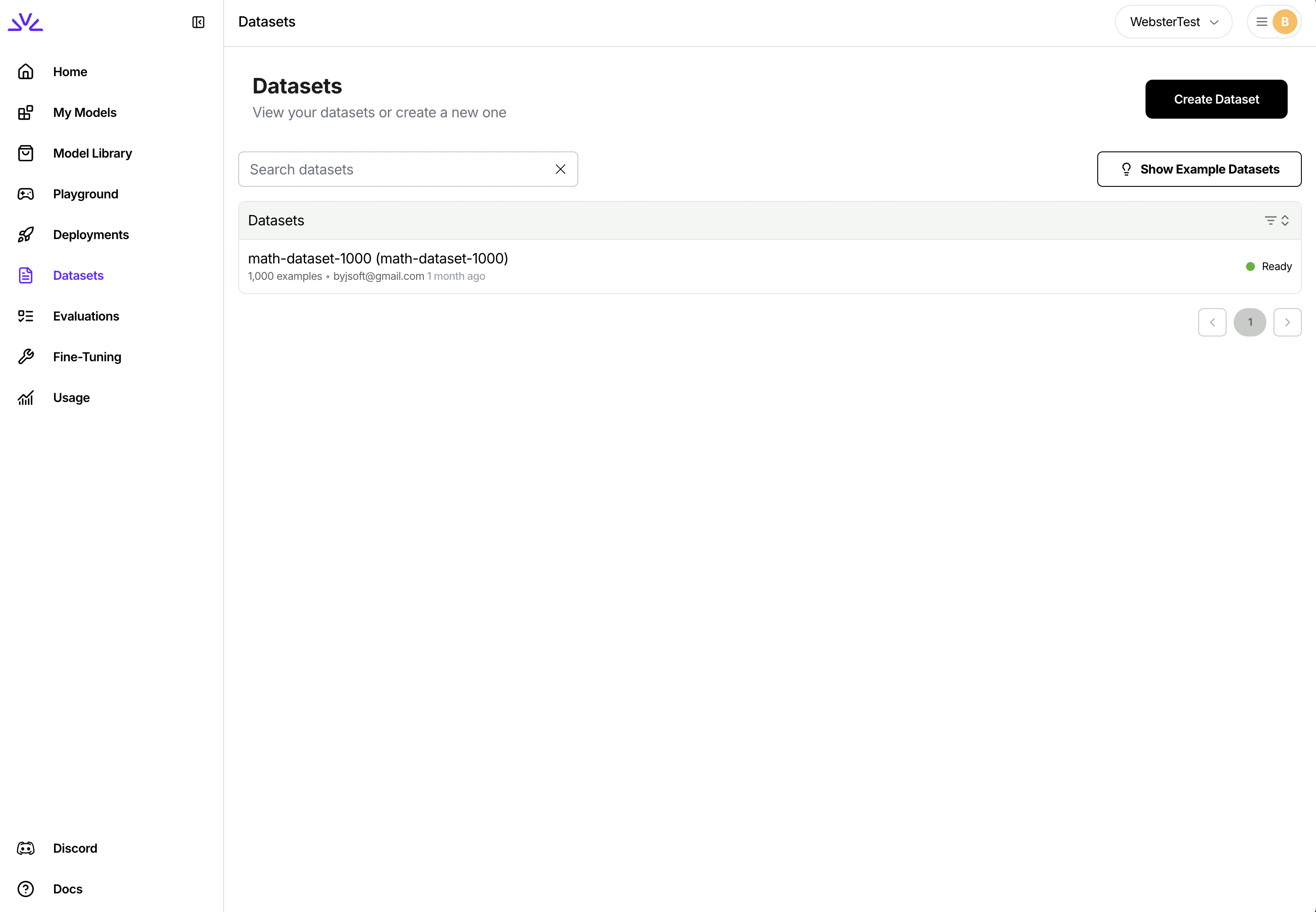
* You can simply navigate to the dataset tab, click `Create Dataset` and follow the wizard.
 ```bash theme={null}
firectl dataset create /path/to/jsonl/file
```
You need to make two separate HTTP requests. One for creating the dataset entry and one for uploading the dataset. Full reference here: [Create dataset](/api-reference/create-dataset). Note that the `exampleCount` parameter needs to be provided by the client.
```jsx theme={null}
// Create Dataset Entry
const createDatasetPayload = {
datasetId: "trader-poe-sample-data",
dataset: { userUploaded: {} }
// Additional params such as exampleCount
};
const urlCreateDataset = `${BASE_URL}/datasets`;
const response = await fetch(urlCreateDataset, {
method: "POST",
headers: HEADERS_WITH_CONTENT_TYPE,
body: JSON.stringify(createDatasetPayload)
});
```
```jsx theme={null}
// Upload JSONL file
const urlUpload = `${BASE_URL}/datasets/${DATASET_ID}:upload`;
const files = new FormData();
files.append("file", localFileInput.files[0]);
const uploadResponse = await fetch(urlUpload, {
method: "POST",
headers: HEADERS,
body: files
});
```
While all of the above approaches should work, `UI` is more suitable for smaller datasets `< 500MB` while `firectl` might work better for bigger datasets.
Ensure the dataset ID conforms to the [resource id restrictions](/getting-started/concepts#resource-names-and-ids).
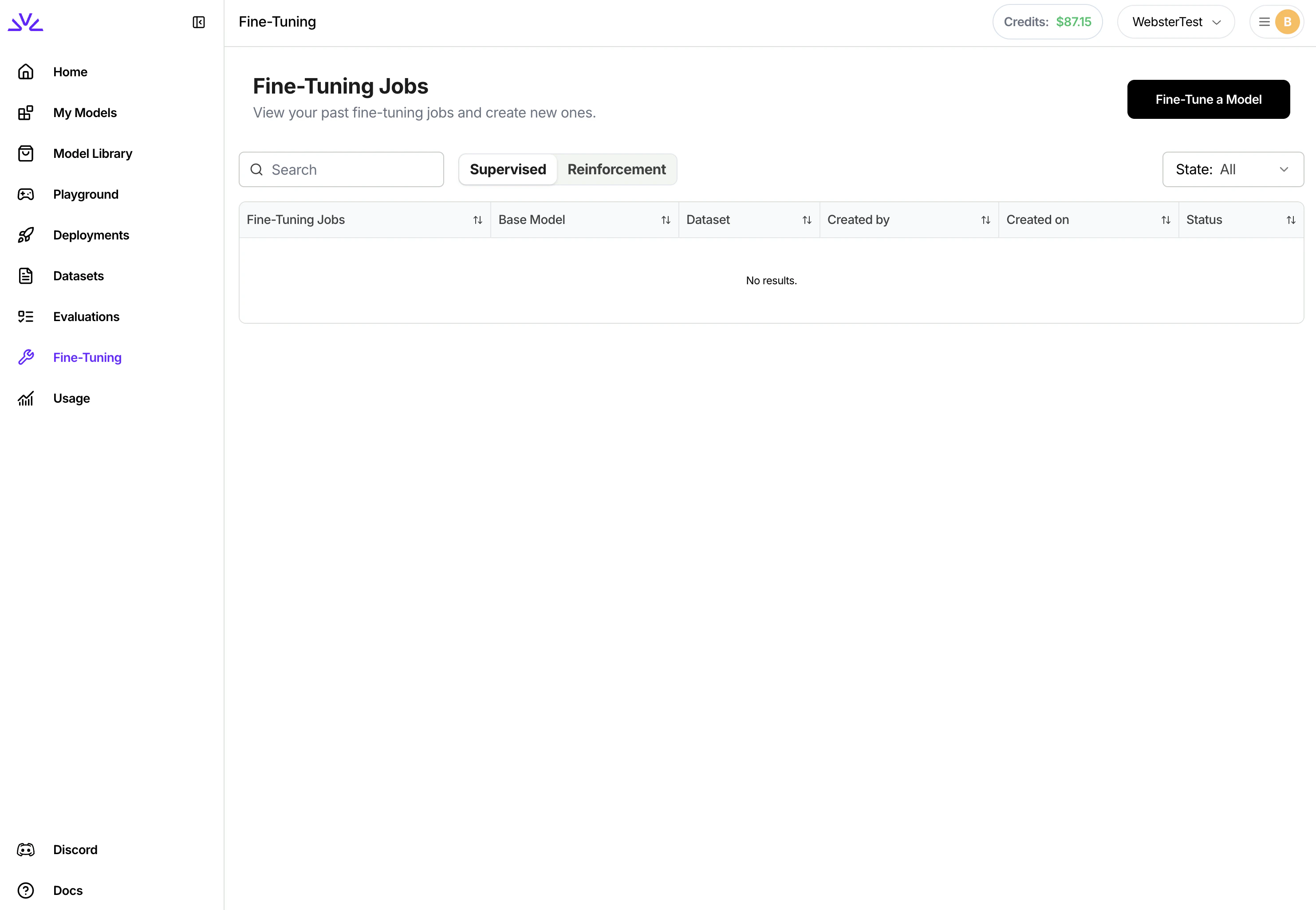
There are also a couple ways to launch the fine-tuning jobs. We highly recommend creating supervised fine tuning jobs via `UI` .
Simply navigate to the `Fine-Tuning` tab, click `Fine-Tune a Model` and follow the wizard from there. You can even pick a LoRA model to start the fine-tuning for continued training.
```bash theme={null}
firectl dataset create /path/to/jsonl/file
```
You need to make two separate HTTP requests. One for creating the dataset entry and one for uploading the dataset. Full reference here: [Create dataset](/api-reference/create-dataset). Note that the `exampleCount` parameter needs to be provided by the client.
```jsx theme={null}
// Create Dataset Entry
const createDatasetPayload = {
datasetId: "trader-poe-sample-data",
dataset: { userUploaded: {} }
// Additional params such as exampleCount
};
const urlCreateDataset = `${BASE_URL}/datasets`;
const response = await fetch(urlCreateDataset, {
method: "POST",
headers: HEADERS_WITH_CONTENT_TYPE,
body: JSON.stringify(createDatasetPayload)
});
```
```jsx theme={null}
// Upload JSONL file
const urlUpload = `${BASE_URL}/datasets/${DATASET_ID}:upload`;
const files = new FormData();
files.append("file", localFileInput.files[0]);
const uploadResponse = await fetch(urlUpload, {
method: "POST",
headers: HEADERS,
body: files
});
```
While all of the above approaches should work, `UI` is more suitable for smaller datasets `< 500MB` while `firectl` might work better for bigger datasets.
Ensure the dataset ID conforms to the [resource id restrictions](/getting-started/concepts#resource-names-and-ids).
There are also a couple ways to launch the fine-tuning jobs. We highly recommend creating supervised fine tuning jobs via `UI` .
Simply navigate to the `Fine-Tuning` tab, click `Fine-Tune a Model` and follow the wizard from there. You can even pick a LoRA model to start the fine-tuning for continued training.
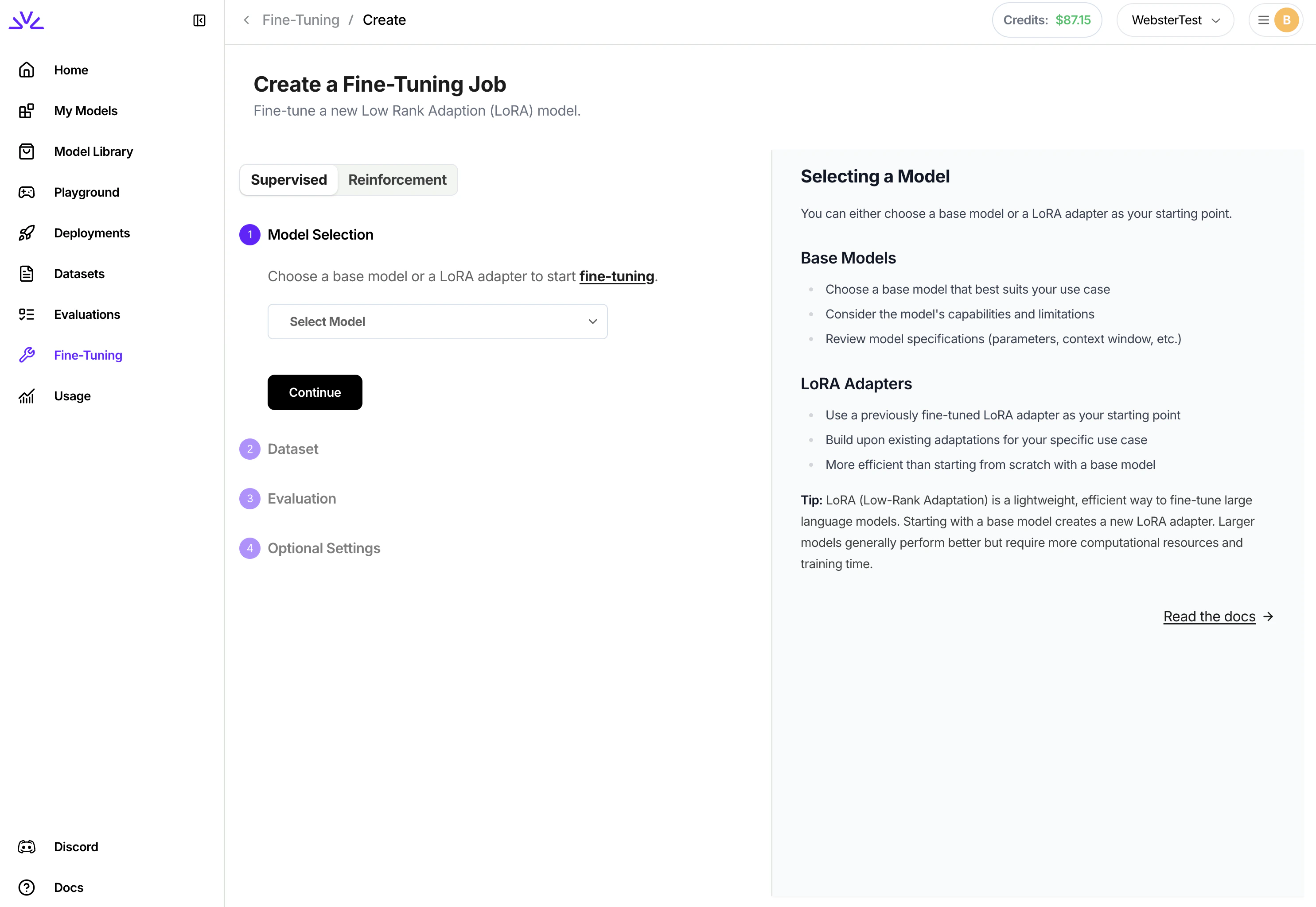 Ensure the fine tuned model ID conforms to the [resource id restrictions](/getting-started/concepts#resource-names-and-ids). This will return a fine-tuning job ID. For a full explanation of the settings available to control the fine-tuning process, including learning rate and epochs, consult [additional SFT job settings](#additional-sft-job-settings).
```bash theme={null}
firectl sftj create --base-model --dataset --output-model
```
Similar to UI, instead of tuning a base model, you can also start tuning from a previous LoRA model using
```bash theme={null}
firectl sftj create --warm-start-from --dataset --output-model
```
Notice that we use `--warm-start-from` instead of `--base-model` when creating this job.
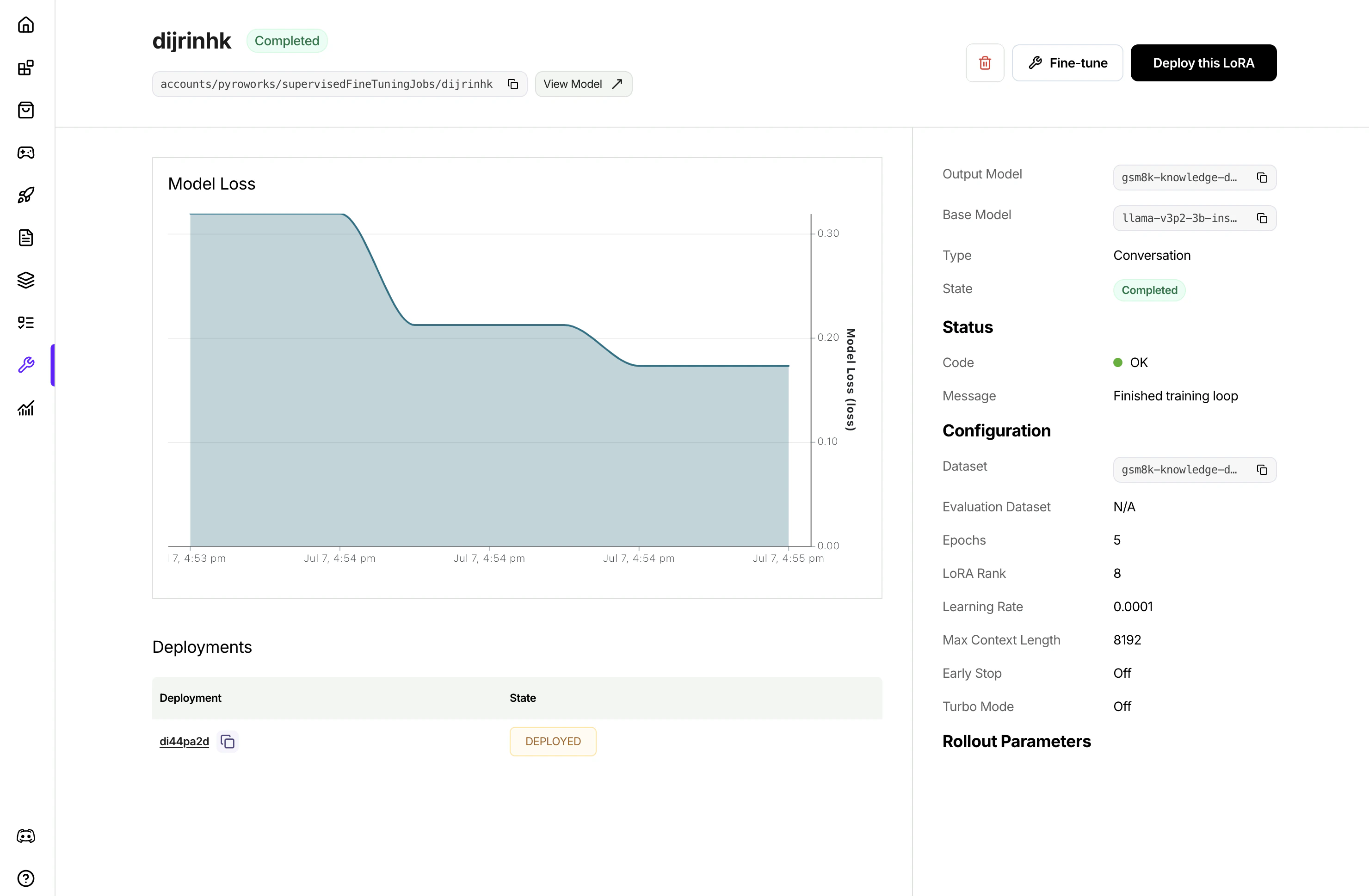
With `UI`, once the job is created, it will show in the list of jobs. Clicking to view the job details to monitor the job progress.
Ensure the fine tuned model ID conforms to the [resource id restrictions](/getting-started/concepts#resource-names-and-ids). This will return a fine-tuning job ID. For a full explanation of the settings available to control the fine-tuning process, including learning rate and epochs, consult [additional SFT job settings](#additional-sft-job-settings).
```bash theme={null}
firectl sftj create --base-model --dataset --output-model
```
Similar to UI, instead of tuning a base model, you can also start tuning from a previous LoRA model using
```bash theme={null}
firectl sftj create --warm-start-from --dataset --output-model
```
Notice that we use `--warm-start-from` instead of `--base-model` when creating this job.
With `UI`, once the job is created, it will show in the list of jobs. Clicking to view the job details to monitor the job progress.
 If the fine-tuned model appears to learn the wrong text or ignore the expected assistant response, use **Render Samples** on the job details page to inspect the rendered token IDs and loss masks. See [Debug SFT tokenization](/fine-tuning/debug-sft-tokenization).
With `firectl`, you can monitor the progress of the tuning job by running
```bash theme={null}
firectl sftj get
```
Once the job successfully completes, you will see the new LoRA model in your model list
```bash theme={null}
firectl model list
```
For a complete Python SDK example that demonstrates the full workflow (creating datasets, uploading files, and launching a supervised fine-tuning job), see the [Python SDK workflow example](https://github.com/fw-ai-external/python-sdk/blob/main/examples/sftj_workflow.py).
## Deploying a fine-tuned model
After fine-tuning completes, deploy your model to make it available for inference:
```bash theme={null}
firectl deployment create
```
This creates a dedicated deployment with performance matching the base model.
For more details on deploying fine-tuned models, including multi-LoRA deployments, see the [Deploying Fine Tuned Models guide](/fine-tuning/deploying-loras).
## Additional SFT job settings
Additional tuning settings are available when starting a fine-tuning job. All of the below settings are optional and will have reasonable defaults if not specified. For settings that affect tuning quality like `epochs` and `learning rate`, we recommend using default settings and only changing hyperparameters if results are not as desired.
By default, the fine-tuning job will run evaluation by running the fine-tuned model against an evaluation set that's created by automatically carving out a portion of your training set. You have the option to explicitly specify a separate evaluation dataset to use instead of carving out training data.
`evaluation_dataset`: The ID of a separate dataset to use for evaluation. Must be pre-uploaded via firectl
```shell theme={null}
firectl sftj create \
--evaluation-dataset my-eval-set \
--base-model MY_BASE_MODEL \
--dataset cancerset \
--output-model my-tuned-model
```
Depending on the size of the model, the default context size will be different. For most models, the default context size is >= 32768. Training examples will be cut-off at 32768 tokens. Usually you do not need to set the max context length unless out of memory error is encountered with higher lora rank and large max context length.
```shell theme={null}
firectl sftj create \
--max-context-length 65536 \
--base-model MY_BASE_MODEL \
--dataset cancerset \
--output-model my-tuned-model
```
Batch size is the number of tokens packed into one forward step during training. One batch could consist of multiple training samples. We do sequence packing on the training samples, and batch size controls how many total tokens will be packed into each batch.
```shell theme={null}
firectl sftj create \
--batch-size 65536 \
--base-model MY_BASE_MODEL \
--dataset cancerset \
--output-model my-tuned-model
```
Epochs are the number of passes over the training data. Our default value is 1. If the model does not follow the training data as much as expected, increase the number of epochs by 1 or 2. Non-integer values are supported.
**Note: we set a max value of 3 million dataset examples × epochs**
```shell theme={null}
firectl sftj create \
--epochs 2.0 \
--base-model MY_BASE_MODEL \
--dataset cancerset \
--output-model my-tuned-model
```
Learning rate controls how fast the model updates from data. We generally do not recommend changing learning rate. The default value is automatically based on your selected model.
```shell theme={null}
firectl sftj create \
--learning-rate 0.0001 \
--base-model MY_BASE_MODEL \
--dataset cancerset \
--output-model my-tuned-model
```
Learning rate warmup steps controls the number of training steps during which the learning rate will be linearly ramped up to the set learning rate.
```shell theme={null}
firectl sftj create \
--learning-rate 0.0001 \
--learning-rate-warmup-steps 200 \
--base-model MY_BASE_MODEL \
--dataset cancerset \
--output-model my-tuned-model
```
Gradient accumulation steps controls the number of forward steps and backward steps to take (gradients are accumulated) before optimizer.step() is taken. Gradient accumulation steps > 1 increases effective batch size.
```shell theme={null}
firectl sftj create \
--gradient-accumulation-steps 4 \
--base-model MY_BASE_MODEL \
--dataset cancerset \
--output-model my-tuned-model
```
LoRA rank refers to the number of parameters that will be tuned in your LoRA add-on. Higher LoRA rank increases the amount of information that can be captured while tuning. LoRA rank must be a power of 2 up to 32. Our default value is 8.
```shell theme={null}
firectl sftj create \
--lora-rank 16 \
--base-model MY_BASE_MODEL \
--dataset cancerset \
--output-model my-tuned-model
```
The fine-tuning service integrates with Weights & Biases to provide observability into the tuning process. To use this feature, you must have a Weights & Biases account and have provisioned an API key.
```shell theme={null}
firectl sftj create \
--wandb-entity my-org \
--wandb-api-key xxx \
--wandb-project "My Project" \
--base-model MY_BASE_MODEL \
--dataset cancerset \
--output-model my-tuned-model
```
By default, the fine-tuning job will generate a random unique ID for the model. This ID is used to refer to the model at inference time. You can optionally specify a custom ID, within [ID constraints](/getting-started/concepts#resource-names-and-ids).
```shell theme={null}
firectl sftj create \
--output-model my-model \
--base-model MY_BASE_MODEL \
--dataset cancerset
```
By default, the fine-tuning job will generate a random unique ID for the fine-tuning job. You can optionally choose a custom ID.
```shell theme={null}
firectl sftj create \
--job-id my-fine-tuning-job \
--base-model MY_BASE_MODEL \
--dataset cancerset \
--output-model my-tuned-model
```
## Appendix
* `Python SDK` [references](/tools-sdks/python-sdk)
* `Restful API` [references](/api-reference/introduction)
* `firectl` [references](/tools-sdks/firectl/firectl)
* [Complete Python SDK workflow example](https://github.com/fw-ai-external/python-sdk/blob/main/examples/sftj_workflow.py) for a code-only implementation
If the fine-tuned model appears to learn the wrong text or ignore the expected assistant response, use **Render Samples** on the job details page to inspect the rendered token IDs and loss masks. See [Debug SFT tokenization](/fine-tuning/debug-sft-tokenization).
With `firectl`, you can monitor the progress of the tuning job by running
```bash theme={null}
firectl sftj get
```
Once the job successfully completes, you will see the new LoRA model in your model list
```bash theme={null}
firectl model list
```
For a complete Python SDK example that demonstrates the full workflow (creating datasets, uploading files, and launching a supervised fine-tuning job), see the [Python SDK workflow example](https://github.com/fw-ai-external/python-sdk/blob/main/examples/sftj_workflow.py).
## Deploying a fine-tuned model
After fine-tuning completes, deploy your model to make it available for inference:
```bash theme={null}
firectl deployment create
```
This creates a dedicated deployment with performance matching the base model.
For more details on deploying fine-tuned models, including multi-LoRA deployments, see the [Deploying Fine Tuned Models guide](/fine-tuning/deploying-loras).
## Additional SFT job settings
Additional tuning settings are available when starting a fine-tuning job. All of the below settings are optional and will have reasonable defaults if not specified. For settings that affect tuning quality like `epochs` and `learning rate`, we recommend using default settings and only changing hyperparameters if results are not as desired.
By default, the fine-tuning job will run evaluation by running the fine-tuned model against an evaluation set that's created by automatically carving out a portion of your training set. You have the option to explicitly specify a separate evaluation dataset to use instead of carving out training data.
`evaluation_dataset`: The ID of a separate dataset to use for evaluation. Must be pre-uploaded via firectl
```shell theme={null}
firectl sftj create \
--evaluation-dataset my-eval-set \
--base-model MY_BASE_MODEL \
--dataset cancerset \
--output-model my-tuned-model
```
Depending on the size of the model, the default context size will be different. For most models, the default context size is >= 32768. Training examples will be cut-off at 32768 tokens. Usually you do not need to set the max context length unless out of memory error is encountered with higher lora rank and large max context length.
```shell theme={null}
firectl sftj create \
--max-context-length 65536 \
--base-model MY_BASE_MODEL \
--dataset cancerset \
--output-model my-tuned-model
```
Batch size is the number of tokens packed into one forward step during training. One batch could consist of multiple training samples. We do sequence packing on the training samples, and batch size controls how many total tokens will be packed into each batch.
```shell theme={null}
firectl sftj create \
--batch-size 65536 \
--base-model MY_BASE_MODEL \
--dataset cancerset \
--output-model my-tuned-model
```
Epochs are the number of passes over the training data. Our default value is 1. If the model does not follow the training data as much as expected, increase the number of epochs by 1 or 2. Non-integer values are supported.
**Note: we set a max value of 3 million dataset examples × epochs**
```shell theme={null}
firectl sftj create \
--epochs 2.0 \
--base-model MY_BASE_MODEL \
--dataset cancerset \
--output-model my-tuned-model
```
Learning rate controls how fast the model updates from data. We generally do not recommend changing learning rate. The default value is automatically based on your selected model.
```shell theme={null}
firectl sftj create \
--learning-rate 0.0001 \
--base-model MY_BASE_MODEL \
--dataset cancerset \
--output-model my-tuned-model
```
Learning rate warmup steps controls the number of training steps during which the learning rate will be linearly ramped up to the set learning rate.
```shell theme={null}
firectl sftj create \
--learning-rate 0.0001 \
--learning-rate-warmup-steps 200 \
--base-model MY_BASE_MODEL \
--dataset cancerset \
--output-model my-tuned-model
```
Gradient accumulation steps controls the number of forward steps and backward steps to take (gradients are accumulated) before optimizer.step() is taken. Gradient accumulation steps > 1 increases effective batch size.
```shell theme={null}
firectl sftj create \
--gradient-accumulation-steps 4 \
--base-model MY_BASE_MODEL \
--dataset cancerset \
--output-model my-tuned-model
```
LoRA rank refers to the number of parameters that will be tuned in your LoRA add-on. Higher LoRA rank increases the amount of information that can be captured while tuning. LoRA rank must be a power of 2 up to 32. Our default value is 8.
```shell theme={null}
firectl sftj create \
--lora-rank 16 \
--base-model MY_BASE_MODEL \
--dataset cancerset \
--output-model my-tuned-model
```
The fine-tuning service integrates with Weights & Biases to provide observability into the tuning process. To use this feature, you must have a Weights & Biases account and have provisioned an API key.
```shell theme={null}
firectl sftj create \
--wandb-entity my-org \
--wandb-api-key xxx \
--wandb-project "My Project" \
--base-model MY_BASE_MODEL \
--dataset cancerset \
--output-model my-tuned-model
```
By default, the fine-tuning job will generate a random unique ID for the model. This ID is used to refer to the model at inference time. You can optionally specify a custom ID, within [ID constraints](/getting-started/concepts#resource-names-and-ids).
```shell theme={null}
firectl sftj create \
--output-model my-model \
--base-model MY_BASE_MODEL \
--dataset cancerset
```
By default, the fine-tuning job will generate a random unique ID for the fine-tuning job. You can optionally choose a custom ID.
```shell theme={null}
firectl sftj create \
--job-id my-fine-tuning-job \
--base-model MY_BASE_MODEL \
--dataset cancerset \
--output-model my-tuned-model
```
## Appendix
* `Python SDK` [references](/tools-sdks/python-sdk)
* `Restful API` [references](/api-reference/introduction)
* `firectl` [references](/tools-sdks/firectl/firectl)
* [Complete Python SDK workflow example](https://github.com/fw-ai-external/python-sdk/blob/main/examples/sftj_workflow.py) for a code-only implementation